Chapter 1: Understanding the ChatGPT Application
1.1 ChatGPT in Plain English
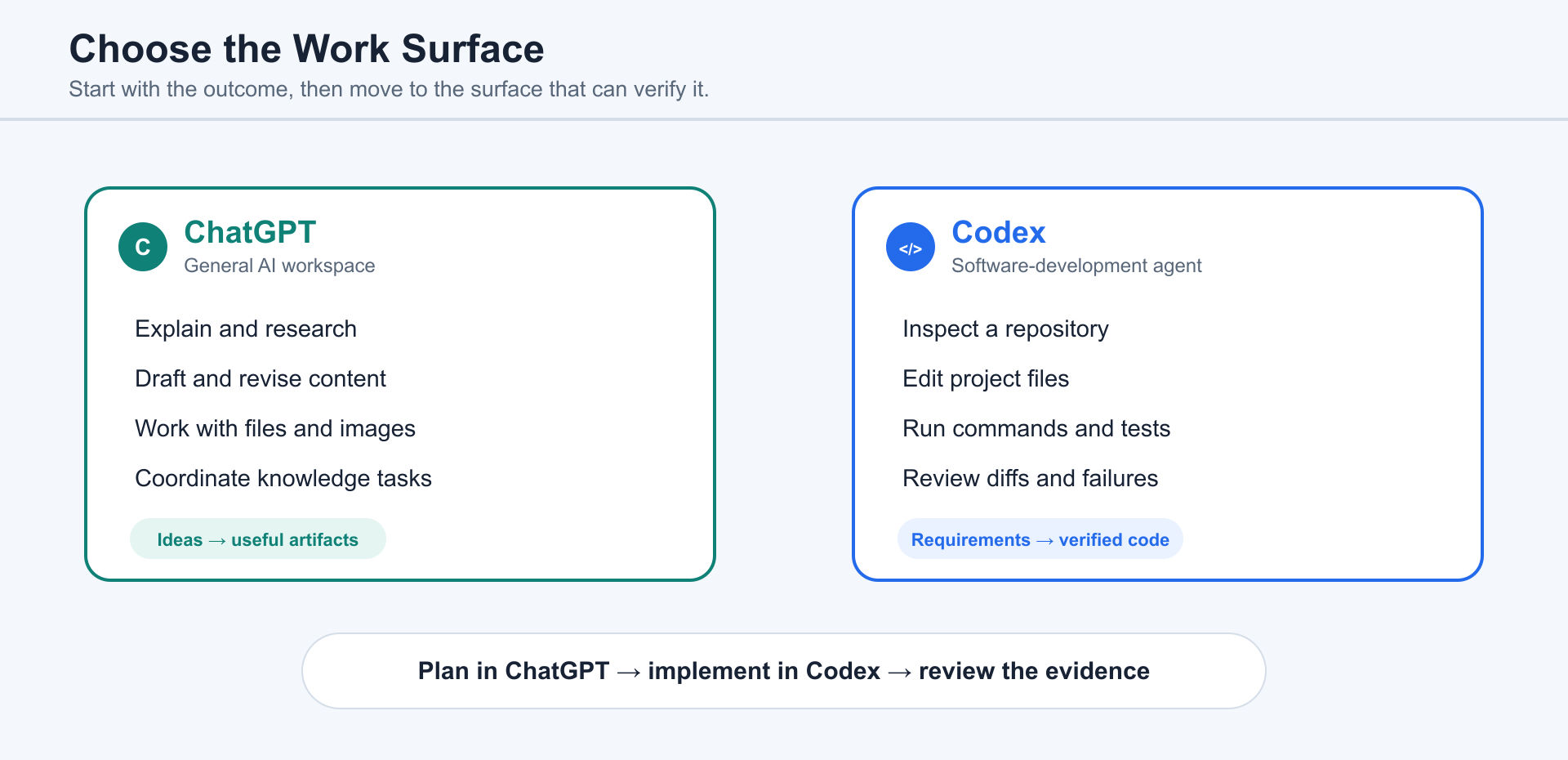
Section titled “1.1 ChatGPT in Plain English”ChatGPT is both an AI assistant and a general workspace for conversation, research, writing, files, images, and other knowledge work.
Codex is the specialized software-development agent. Use it when work depends on a codebase, local files, terminal commands, tests, diffs, pull requests, or a development environment.
The distinction is about the work, not the user’s identity. A task can begin as research or planning in ChatGPT and move into Codex when implementation and code verification become necessary.
The active project, supplied files, available tools, and current instructions determine what either agent can use. Chapter 13 owns the full explanation of permissions, sandboxes, and review boundaries.
1.2 More Than a Chatbot: Assistant, Creative Partner, and Digital Worker
Section titled “1.2 More Than a Chatbot: Assistant, Creative Partner, and Digital Worker”A chatbot gives responses. ChatGPT can help produce outcomes.
That distinction is the heart of understanding ChatGPT. When you ask a chatbot, “How do I build a landing page?” it may explain HTML, CSS, design structure, and deployment steps. When you ask ChatGPT, it can often help create the actual files, run the local project, inspect the result, fix layout problems, and leave you with something you can open in a browser.
This shift changes the relationship between human and AI. You are not only asking for information, . You are delegating pieces of work.
ChatGPT can act in at least three roles.
First, ChatGPT is an AI assistant. In this role, it helps with thinking, writing, planning, research, summarization, organization, and decision support. You can ask it to explain a technical idea in plain English, turn messy notes into a clean outline, draft an email, compare options, or help you prepare for a meeting. This is the role most similar to ChatGPT.
Second, the software-development role carries a task into a real codebase: inspecting files, finding bugs, implementing features, running tests, and preparing changes for review. It accelerates engineering work without replacing engineering judgment.
Third, ChatGPT can support operational work when an appropriate tool or connected service is available and authorized. It may help create or update documents, spreadsheets, presentations, websites, and other digital artifacts. Review access and external actions using the canonical permission guidance in Chapter 13.
This does not mean ChatGPT should be left alone with every task. Effective use still depends on human judgment. A good human manager still matters. ChatGPT needs direction, context, review, and boundaries. The better you describe the goal, the constraints, the intended audience, and the definition of done, the more useful ChatGPT becomes.
The important mental model is this:
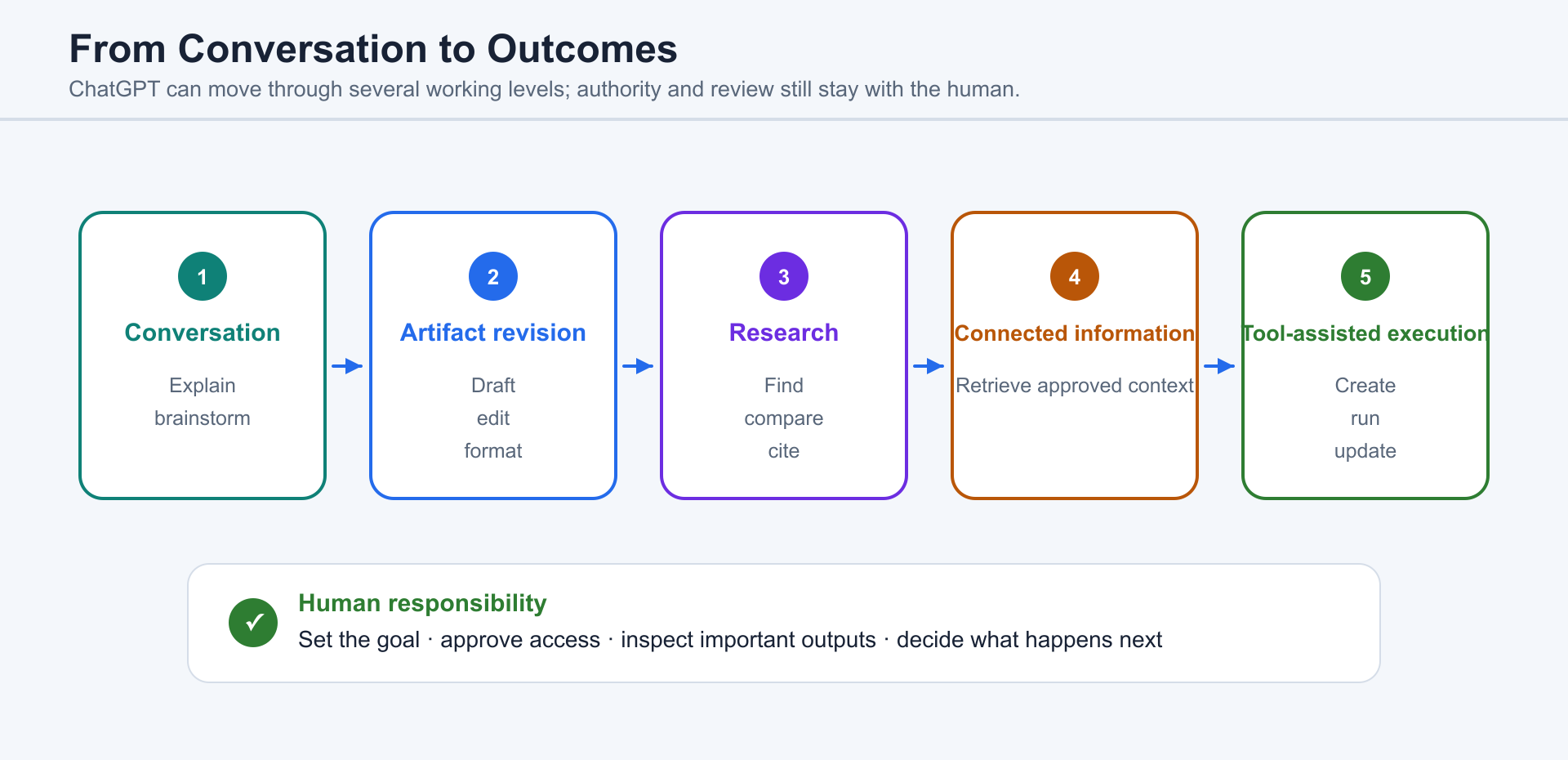
ChatGPT can operate at several levels: conversation, artifact revision, research, connected information, and tool-assisted execution.
Conversation still matters, but the working mode matters too. A request may ask ChatGPT to explain or draft, ask an App to retrieve approved information, or ask Codex to inspect a workspace, make code changes, run checks, and report what remains unverified.
That is a different kind of computing experience.
For current official examples of the Codex project and task interfaces, continue to Chapter 3.
1.3 How to Access ChatGPT
Section titled “1.3 How to Access ChatGPT”Use a supported ChatGPT access point that fits the task and the policies of your account or organization. Availability can vary by platform, account, region, and workspace policy.
Before beginning, identify the intended outcome, required context, tools, and review method. Chapter 3 explains Projects, files, connected capabilities, publishing, and recurring work without relying on a specific interface layout.
Choosing a ChatGPT Plan
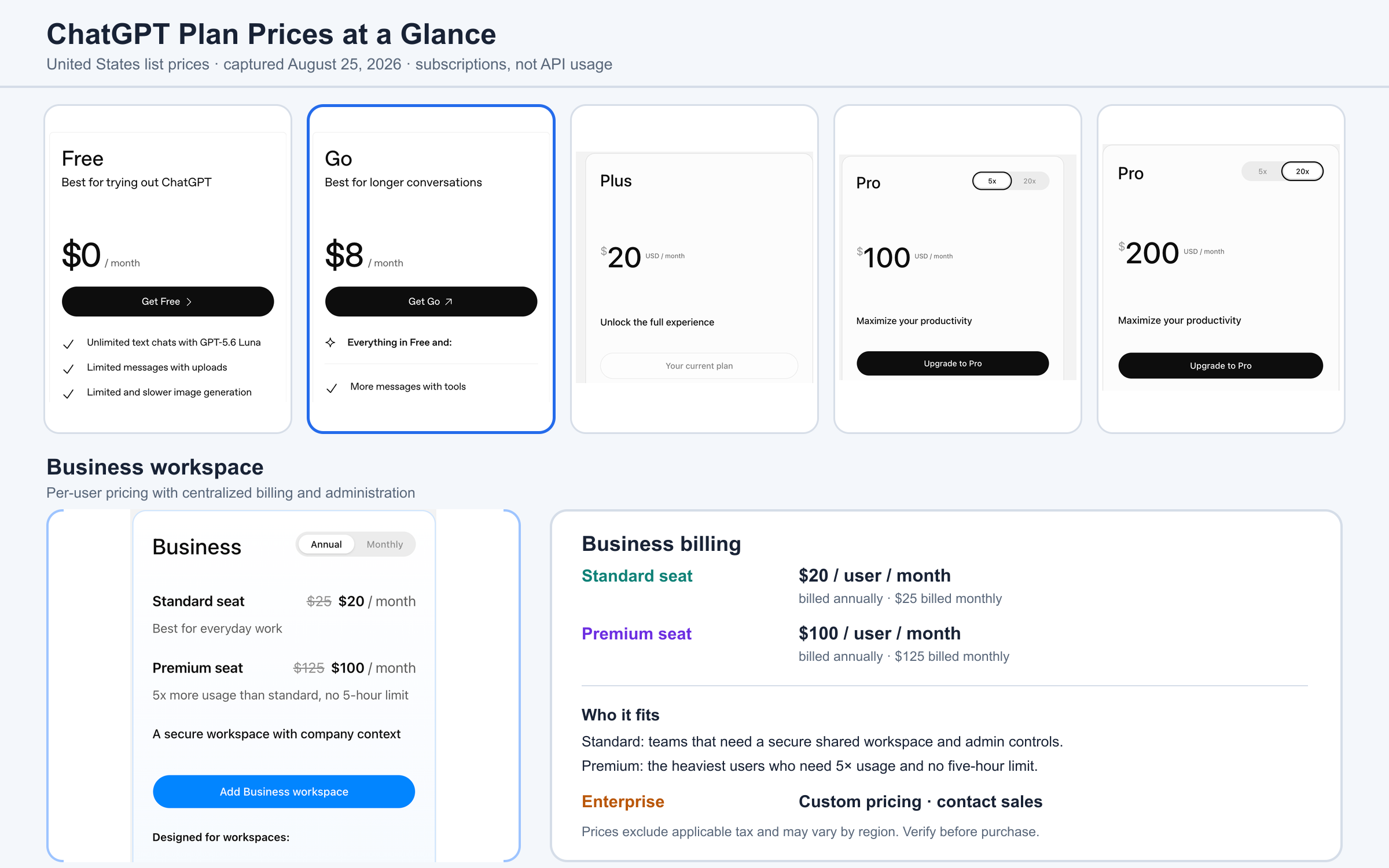
Section titled “Choosing a ChatGPT Plan”Pricing below was checked on August 25, 2026 and reflects United States list prices in USD before applicable tax. Availability, local currency, mobile-app billing, promotions, features, and usage limits can vary by region and may change. Verify the current offer on the official ChatGPT pricing page before purchasing. API usage is billed separately and is not included in this comparison.
| Plan | Current US list price | Best fit |
|---|---|---|
| Free | $0/month | First-time or occasional users learning what ChatGPT can do. |
| Go | $8/month | Budget-conscious individuals who mainly need longer conversations, more uploads, more image creation, and longer memory than Free. This plan may include ads. |
| Plus | $20/month | Individuals doing regular advanced writing, research, analysis, image work, or coding who need stronger reasoning and expanded access to tools such as Codex. |
| Pro 5× | $100/month | Frequent individual users running substantial research or coding projects who regularly reach Plus limits but do not need the highest allowance. |
| Pro 20× | $200/month | Heavy daily users running demanding or parallel workflows who need the highest individual usage allowance. |
| Business Standard | $20/user/month when billed annually; $25 monthly | Teams of at least two people that need a secure shared workspace, centralized billing, administration, company context, and business-data protections. |
| Business Premium | $100/user/month when billed annually; $125 monthly | The heaviest users inside a Business workspace who need 5× Standard usage and no five-hour usage limit. Rollout or eligibility may apply. |
| Enterprise | Custom pricing | Larger organizations that need contracted support, advanced identity and security controls, governance, or custom commercial terms. |
The simplest choice is to start at the lowest tier that supports the work you actually do. Stay on Free while you are learning. Choose Go when Free feels restrictive but your work still centers on everyday conversation, uploads, images, and memory. Choose Plus when advanced reasoning, deep research, Codex, or regular professional work matters. Move to Pro only after your real usage repeatedly reaches Plus limits. Choose Business for shared company work and administration, not merely because several people happen to use ChatGPT. Enterprise is a procurement and governance decision rather than a normal individual upgrade.
OpenAI describes Go as the lower-cost bridge between Free and Plus, while the current Pro tiers separate substantial 5× usage from the highest 20× allowance. Business pricing is per user and uses different annual and monthly rates. See OpenAI’s official explanations of ChatGPT Go, the two Pro tiers, and Business seat pricing for the current details.
At the time of writing, Claude’s public individual lineup moves from Free to Pro at $20 per month ($17 per month as an annual-subscription equivalent), then to Max from $100. Anthropic does not currently offer an $8 paid individual tier. ChatGPT Go therefore provides a lower paid entry point and can be more budget-friendly for someone who has outgrown a free plan but does not need a $20 advanced tier. This is a narrow price comparison, not a claim that one product is always better: compare the features and limits that matter to your work on Anthropic’s official pricing page.
1.4 What You Need Before Using ChatGPT
Section titled “1.4 What You Need Before Using ChatGPT”Before using ChatGPT, you need an appropriate account or access path, a supported device, a concrete goal or source material, and a habit of reviewing important results.
You also need a supported device and an appropriate working surface. ChatGPT is available across web, desktop, and mobile experiences, while local repositories, terminal commands, and software-development workflows require a supported Codex surface. On a work device, organizational policy may control installation, sign-in, connected Apps, local-file access, and external actions.
You need a project or task. ChatGPT works best when it has something concrete to work on: a folder of files, a codebase, a document, a website idea, a spreadsheet, a repetitive workflow, or a clearly described goal. You do not need to be a programmer to begin, but you do need to give ChatGPT enough context to be useful.
Finally, you need a review habit. ChatGPT can move quickly, and that is both its gift and its risk. You should read important outputs, check facts, test code, inspect files before sharing them, and pause before giving it access to sensitive data. Think of ChatGPT as a highly capable assistant whose work still needs human judgment.
1.5 What ChatGPT Can Do Well
Section titled “1.5 What ChatGPT Can Do Well”ChatGPT can do many things well because it has been trained on patterns of language, code, reasoning, documents, and digital work. More importantly, it can use tools. That combination gives it a practical advantage: it can connect thinking with action.
ChatGPT can explain. It can take a difficult topic and restate it in plain English. It can compare alternatives, define terms, summarize a long document, or walk you through a process step by step.
ChatGPT can write. It can draft emails, blog posts, outlines, reports, scripts, documentation, proposals, lesson plans, and book chapters. It is especially useful when you already know the rough idea but need help turning it into structure and language.
ChatGPT can explain code, compare approaches, and generate examples. Software implementation can extend that help into project files, commands, debugging, tests, and pull-request review.
ChatGPT can inspect. It can read files, search through a project, compare versions, identify likely causes of a bug, and help you understand a system you did not write.
ChatGPT can automate. It can help turn repeated manual work into scripts, scheduled tasks, templates, or workflows. For people who do not think of themselves as programmers, this may be one of the most valuable uses. You can describe the repetitive thing you do, and ChatGPT can help design a better process.
ChatGPT can mimic parts of human thinking and action. This phrase needs care. ChatGPT does not have human experience, intention, or common sense in the same way a person does. But it can imitate many visible patterns of human work: breaking a task into steps, checking a result, revising a draft, comparing options, following instructions, and learning from feedback inside a conversation. That makes it feel less like a static tool and more like a collaborator.
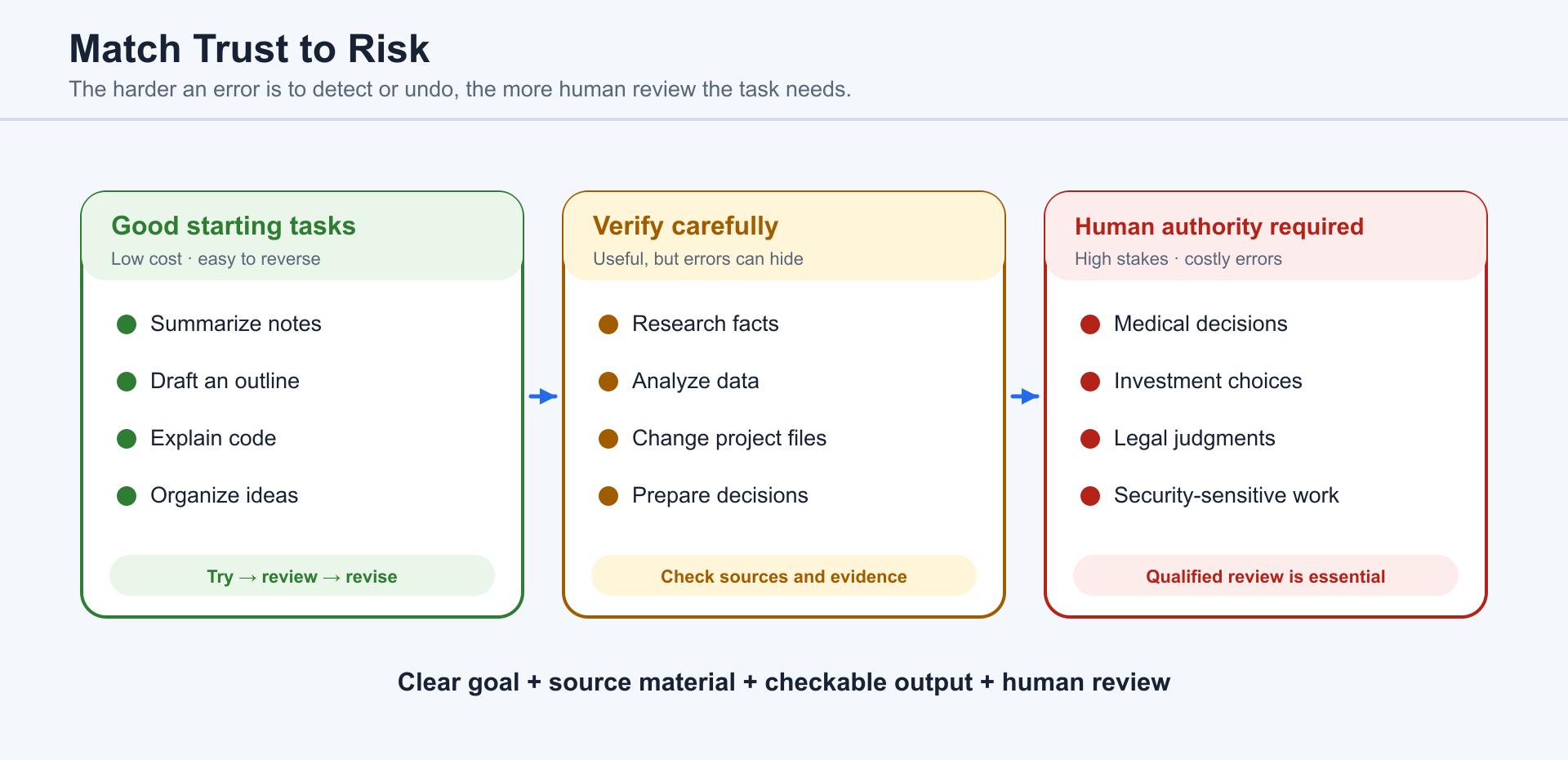
ChatGPT is especially good when:
- The goal is clear.
- The source material is available.
- The task can be checked.
- The user can review the result.
- Mistakes are fixable.
That last point is important. ChatGPT shines in environments where iteration is cheap. If a paragraph is awkward, it can revise it. If a test fails, it can inspect the failure and try again. If a layout is broken, it can adjust the code and re-check the page. The loop of attempt, feedback, and correction is where ChatGPT becomes powerful.
1.6 What ChatGPT Cannot Do Reliably
Section titled “1.6 What ChatGPT Cannot Do Reliably”ChatGPT is powerful, but it is not magic. Beginners should learn its limits early.
One important example is stock trading.
ChatGPT should not be used as a reliable stock-picking or trading system. It can explain financial concepts. It can summarize public company information. It can help organize a spreadsheet, compare historical data, or draft questions to ask a financial advisor. But asking ChatGPT to pick stocks for you is a different matter.
The problem is not that ChatGPT knows nothing about markets. The problem is that markets are forward-looking, noisy, adaptive, and affected by events no model can perfectly anticipate. If you ask ChatGPT to predict a stock, it may reason from patterns that existed in past data, public narratives, or historical examples. But experienced investors know the warning: past performance is not a reliable indicator of future results.
That warning matters even more with AI. A model can sound confident while being wrong. It can produce a clean explanation for a prediction that does not actually have predictive power. It can identify a pattern that looked meaningful in the past but fails the moment real money is involved. It can be helpful as a research assistant, but unreliable as an autonomous trading tool.
So far, there is no convincing everyday evidence that ChatGPT can be trusted as a stock-trading engine. It may help with parts of the workflow: learning, organizing information, drafting analysis, checking assumptions, and building tools. But its performance as a trading decision-maker varies, and the downside of being wrong can be expensive.
Another example is medical diagnosis.
ChatGPT can be useful when you want to understand general health information. It can explain medical terms, summarize a public article, help you prepare questions for a doctor, or organize notes before an appointment. But it should not be trusted to diagnose an illness, interpret a serious symptom, choose a medication, or decide whether a person needs urgent care.
The reason is simple: medical decisions depend on details that ChatGPT may not have and cannot verify. A human clinician can examine the patient, order tests, understand medical history, weigh risk factors, and take responsibility for the decision. ChatGPT can produce language that sounds clear and professional, but a polished explanation is not the same thing as a diagnosis. In health matters, confidence without examination can be dangerous.
The broader lesson is this:
Do not use ChatGPT as the final authority in high-stakes domains where errors are costly, hard to detect, or impossible to undo.
This includes investing, medical decisions, legal decisions, security-sensitive work, hiring decisions, and anything involving private or regulated data. ChatGPT can assist, but a qualified human must remain responsible.
ChatGPT also cannot reliably know what you forgot to tell it. If your task depends on hidden context, company policy, private constraints, or personal preferences, you need to provide that context. Otherwise, ChatGPT will fill gaps with plausible assumptions.
It can also make factual mistakes. It can misunderstand a file. It can choose the wrong technical approach. It can overcomplicate a simple task. It can produce code that works in one case but fails in another. It can sometimes follow the letter of your prompt while missing the spirit.
None of this makes ChatGPT useless. It simply means you should use it the way skilled people use powerful tools: with attention.
1.7 How Beginners Should Approach ChatGPT
Section titled “1.7 How Beginners Should Approach ChatGPT”The beginner’s mistake is thinking you need the perfect prompt.
You do not.
A better starting point is to treat ChatGPT like a capable collaborator who needs context, direction, and feedback. You can begin messily. You can say what you are trying to do, what you have already tried, what you do not understand, and what a good result would look like.
There are two basic prompting styles worth understanding: straight prompting and reverse prompting.
Straight prompting is the familiar style. The human assumes leadership over the task and asks the AI to fill in details. For example:
“Write a five-paragraph introduction to my ebook.”
“Fix this bug in my React app.”
“Summarize this PDF into action items.”
“Create a weekly meal plan for a family of four.”
Straight prompting works well when you know the goal and can describe the output. You are the director. ChatGPT is the assistant.
But sometimes you do not know what to ask. You may know you want to be more productive, build a business, write a book, learn coding, organize your files, or automate your work, but you do not yet know which tasks ChatGPT can take off your plate. In that situation, straight prompting can feel strangely difficult. You are staring at a blank prompt box, trying to invent the right question for a tool whose full abilities you do not yet understand.
This is where reverse prompting becomes useful.
Alex Finn has popularized a simple version of this idea: instead of only asking the AI questions, ask the AI to ask you questions. The goal is to let the AI discover more context about your life, goals, bottlenecks, preferences, and current workload so it can suggest better ways to help.
A beginner-friendly reverse prompt looks like this:
Based on what you know about me and my goals, what additional information can I provide so you can help me achieve my goals faster and take as much off my plate as possible?
After answering ChatGPT’s questions, you can follow up with:
How can you help me get closer to these goals? What tasks can you do for me?
This flips the usual dynamic. Instead of assuming you already know how to use ChatGPT, you let ChatGPT help map the possibility space.
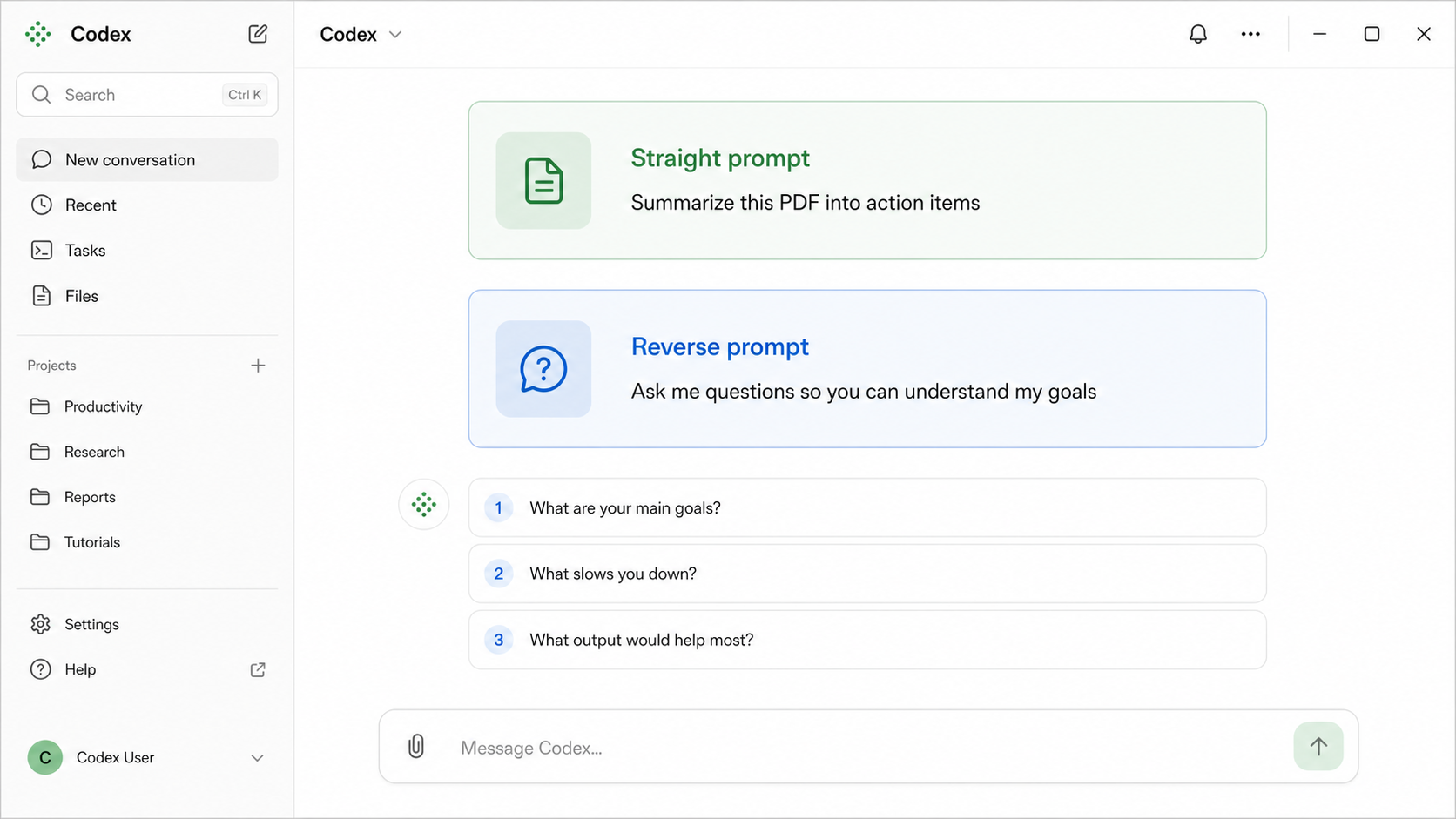
Reverse prompting is especially helpful because the relationship between human and AI can be complex. Sometimes the human is the expert and the AI is filling in details. Other times the AI has a broader view of possible workflows than the beginner does. In those moments, the best prompt is not a command. It is an invitation:
“Help me figure out how you can help.”
For beginners, the best approach is to start with low-risk, useful tasks. Ask ChatGPT to organize your notes, explain a concept, draft an outline, improve an email, inspect a small project, or automate a harmless repetitive task. Watch how it works. Notice when it asks good questions. Notice when it assumes too much. Notice what kinds of instructions produce better results.
Over time, you will develop a working rhythm:
- Give ChatGPT the goal.
- Give it the context.
- Tell it the constraints.
- Ask it to explain its plan when the task is complex.
- Let it work.
- Review the result.
- Ask for revisions.
The goal is not to become a prompt engineer in some narrow technical sense. The goal is to become a better delegator.
ChatGPT rewards clear thinking, but it can also help create clear thinking. That is what makes it such an important tool for beginners. You can arrive with confusion, fragments, rough ideas, or half-formed goals, and use the conversation to shape them into action.
The best way to learn ChatGPT is not to read about every feature before using it. The best way is to pick one real task and begin.
Start small. Stay curious. Check the work. Then gradually give ChatGPT more responsibility as your own judgment improves.
That is how ChatGPT becomes more than an app. It becomes a new way to work.
1.8 ChatGPT, Claude, Gemini, and Specialized Coding Agents
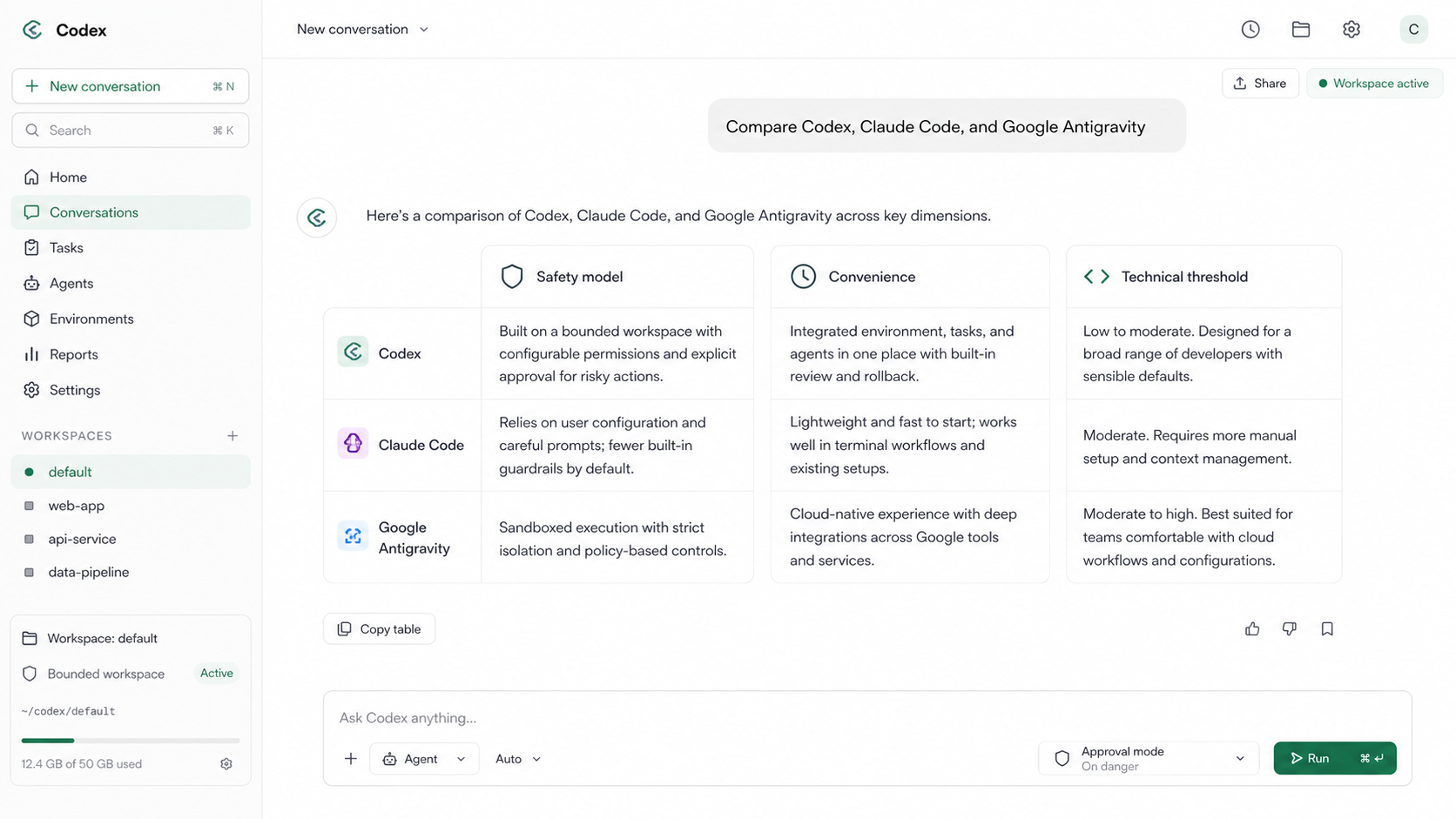
Section titled “1.8 ChatGPT, Claude, Gemini, and Specialized Coding Agents”ChatGPT, Claude Code, and Google Antigravity belong to the same broad generation of agentic development tools, but they do not make exactly the same tradeoffs. All three can inspect code, edit files, run commands, and help move a project from an instruction toward a working result. The practical differences are most visible in how they define safety, how much friction they place between intention and action, and how much technical knowledge they expect from the user.
Permission systems and product behavior change. Evaluate each tool using the canonical trust model in Chapter 13: grant the narrowest workable access, distinguish local edits from external actions, inspect evidence, and keep consequential decisions under human review.
In convenience, ChatGPT is often the easiest general starting point because it combines conversation, files, tools, document work, and coding in one workspace. Claude Code can feel faster and more natural to people who already live in a terminal and want an AI partner embedded in that habit. Antigravity can be attractive for developers who want an integrated IDE and browser workflow, especially when visual verification is part of the task.
The technical threshold follows the same pattern. A beginner can use ChatGPT for useful work without first mastering the shell, although deeper technical knowledge still improves supervision. Claude Code generally rewards stronger command-line and software-engineering knowledge. Antigravity presents a familiar visual environment, but using autonomous agents safely still requires understanding repositories, permissions, browser actions, testing, and recovery.
The best choice is not the tool with the longest feature list. It is the tool whose operating model matches the user’s skills and risk tolerance. A non-programmer or mixed-work user may prefer ChatGPT’s broader workspace. A terminal-oriented engineer may prefer Claude Code’s configurable precision. A developer coordinating editor, terminal, and browser tasks may prefer Antigravity’s integrated agent experience. In every case, convenience should increase gradually with trust: begin with a limited workspace, keep important work under version control, maintain backups, inspect proposed changes, and reserve full access for situations where it is truly necessary.