Chapter 5: Coding With ChatGPT and Codex for Beginners
Coding can feel like a locked room. This chapter turns it into a beginner workflow: describe the goal, inspect the project, make a bounded change, run the relevant checks, and review the evidence.
This chapter is for people who do not yet think of themselves as programmers. It separates two common goals that beginners often mix together: building a website and building an app. A website usually presents information, content, pages, images, forms, and calls to action. An app usually lets users do something: sign in, save data, calculate, search, upload, automate, or return to a personal workflow over time.
Use the ChatGPT/Codex distinction defined in Chapter 1. Beginners do not need to start with a professional full-stack codebase; a visual builder, template, practice repository, small script, or toy app may provide a safer first outcome.
5.1 What Coding Means in Everyday Language
Section titled “5.1 What Coding Means in Everyday Language”Coding means giving a computer precise instructions. A recipe tells a cook how to make a dish. A spreadsheet formula tells a cell how to calculate a value. A website builder tells a browser what to show. A WordPress theme controls layout and style. A script tells the computer how to repeat a task. Code is not magic; it is structured instruction.
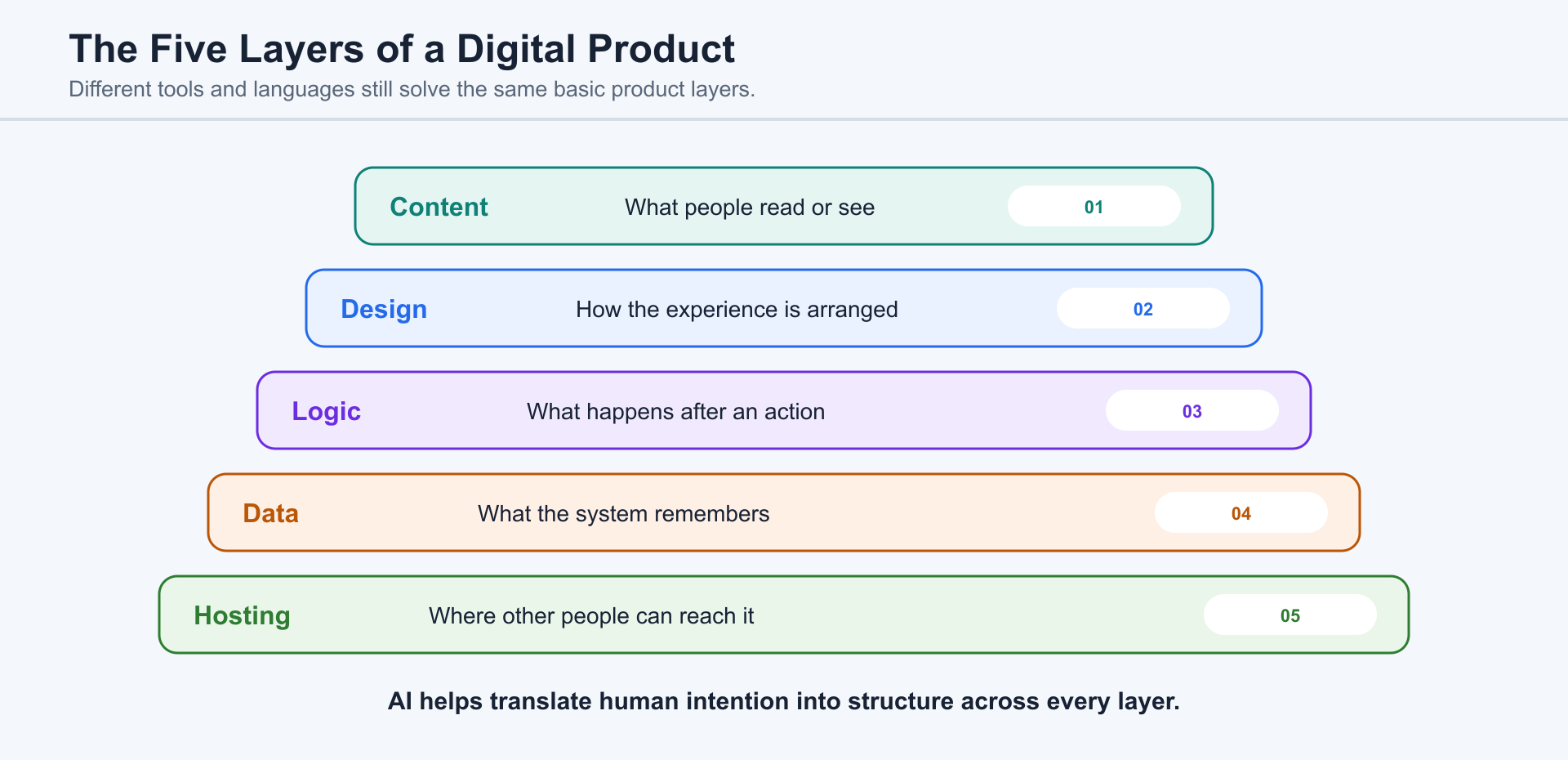
For a beginner, it helps to think in layers. Content is what people read or see. Design is how it is arranged. Logic is what happens when someone clicks, submits, searches, or saves. Data is what the system remembers. Hosting is where the website or app lives so other people can reach it. Whether you use WordPress, PHP, Python, Node.js, TypeScript, or a drag-and-drop builder, these same layers appear again and again.
AI assistance can translate between human intention and technical structure. You can describe a page, workflow, or error in ordinary language, then connect that description to project files, commands, and reviewable behavior.
5.2 Why Non-Programmers Can Still Build With AI
Section titled “5.2 Why Non-Programmers Can Still Build With AI”Many useful technical tasks begin as ordinary human goals: publish a page, rename files, clean a spreadsheet, automate a repeated step, or fix visible behavior. The first skill is describing the desired outcome and recognizing evidence, not memorizing syntax.
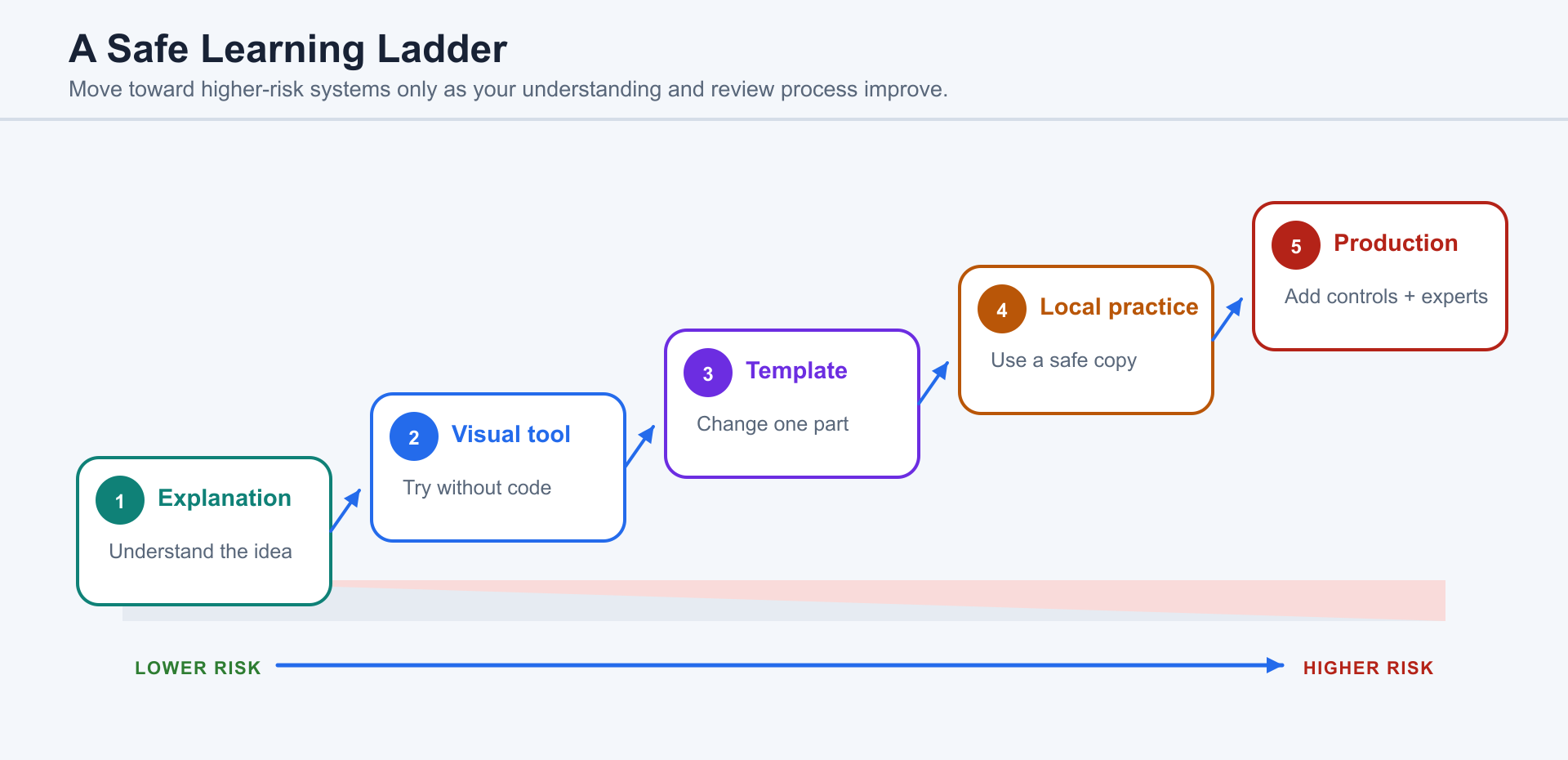
The safest ladder usually begins with explanations and visual tools, moves through templates and small snippets, then reaches a local practice project before touching production systems.
Start where mistakes are cheap: a practice site, copied page, static prototype, personal portfolio, small script, or toy app. Apply the permission and risk boundaries in Chapter 13 before working with payments, accounts, private data, regulated workflows, security settings, or production databases.
5.3 The Beginner Workflow: Describe, Inspect, Edit, Verify
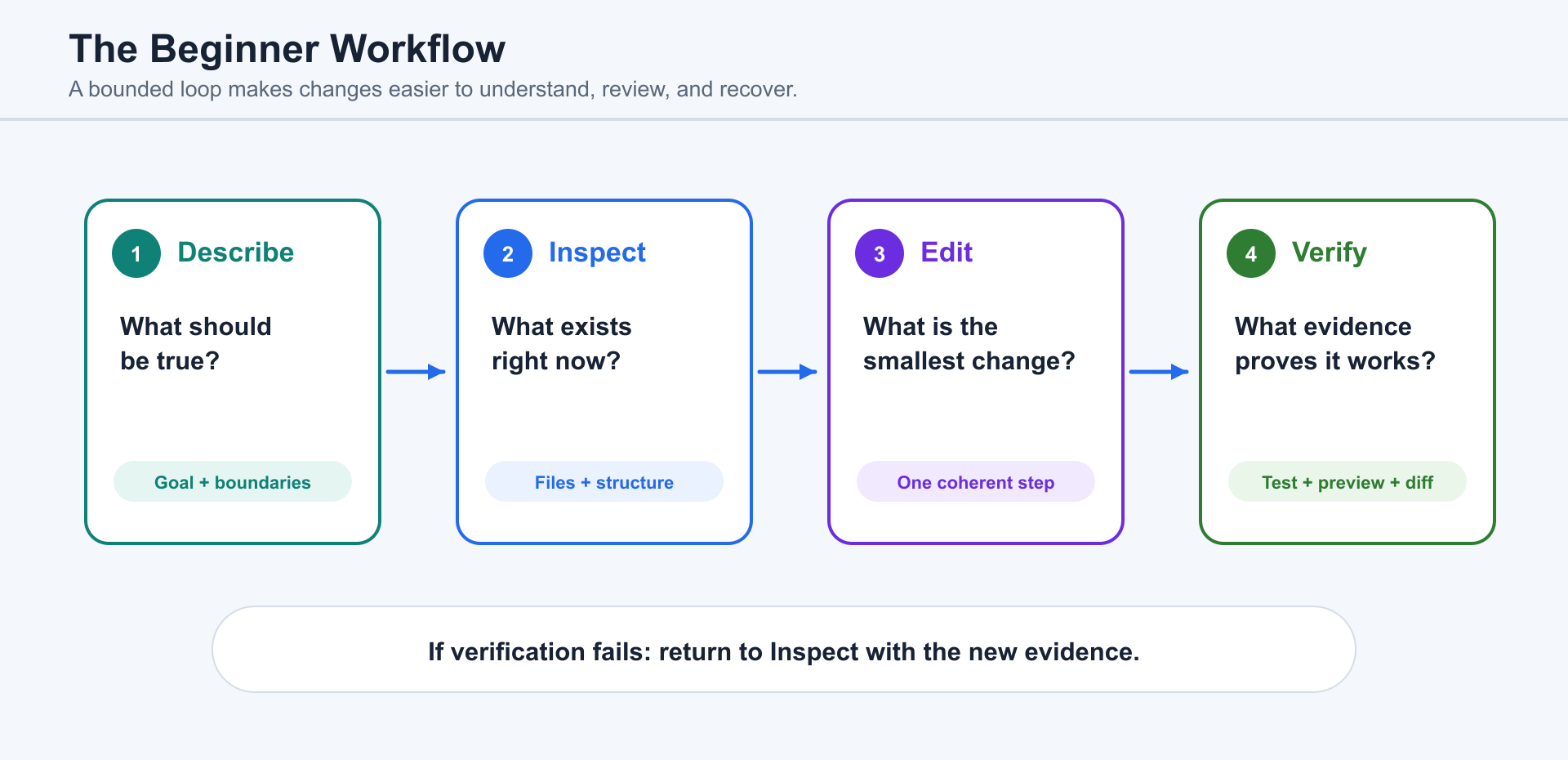
Section titled “5.3 The Beginner Workflow: Describe, Inspect, Edit, Verify”A safe beginner workflow has four steps: describe, inspect, edit, verify.
Describe the outcome in normal language. Say what you want, what you already have, what should stay the same, and what platform you are using. For a website, this might be: “I am building a WordPress site for a local bakery. I need a homepage, menu page, order form, and contact page. Keep it simple and mobile-friendly.” For an app, it might be: “I want a small task tracker that lets me add, complete, and filter tasks. It can run locally first. No login yet.”
Inspect before editing. Ask Codex to look at the current structure before making changes. In a WordPress project, that may mean explaining the theme, plugins, pages, and where custom code should not be edited directly. In a local codebase, it may mean reading the folder structure, package files, routes, components, scripts, and tests.
Edit in small steps. A beginner should prefer one coherent change at a time: one section, one button, one form field, one script, one automation. Small steps make learning easier and mistakes cheaper.
Verify the result. If Codex changes a website, ask it to preview the page when possible and check mobile layout, links, forms, and visual spacing. If it changes code, ask it to run the relevant command or test. If it cannot verify, ask it to say that clearly and explain what you should check manually.
5.4 Asking ChatGPT to Explain Code
Section titled “5.4 Asking ChatGPT to Explain Code”When code looks intimidating, begin with ChatGPT as an explainer. Do not ask for a wholesale rewrite before you understand the code’s purpose, inputs, outputs, and risks.
A strong request is: “Explain this file as if I am new to programming. Tell me what it is responsible for, what the main parts do, how it connects to the website or app, and which parts I should not change yet.” This works for HTML, CSS, JavaScript, PHP templates, Python scripts, Node.js servers, and TypeScript components.
Good explanations connect code to behavior. Instead of only defining syntax, ChatGPT should explain what the code makes the product do, where data enters, what the user sees, and what could fail.
If the explanation is too technical, correct the level: “Use simpler language and one concrete example.” If it is too vague, ask for grounding: “Point to the exact function or file where this happens.” If it is too long, ask for a summary first and details second.
5.5 Asking Codex to Fix Errors
Section titled “5.5 Asking Codex to Fix Errors”Errors are part of coding. Beginners often feel that an error means they have failed. A more useful view is that an error is information. It tells you where the computer got stuck.
When asking Codex to fix an error, provide the exact error message, what you were doing right before it appeared, and what platform you are using. A WordPress error, a PHP warning, a Node.js build failure, a TypeScript type error, and a Python traceback all need slightly different investigation paths.
A good request is: “I clicked Save and got this error. Here is the message. Please explain what it means, inspect the related files or settings, make the smallest safe fix, and tell me how to verify it.” The phrase smallest safe fix matters. Without it, Codex may try to reorganize more than necessary.
After a fix, ask for a short explanation in this form: root cause, changed files or settings, verification, remaining risk. This structure teaches you while protecting you from blindly accepting a patch.
5.6 Building, Controlling, and Migrating a Sites Website
Section titled “5.6 Building, Controlling, and Migrating a Sites Website”A simple website no longer requires one default technical path. Beginners can choose among Sites, a no-code or CMS platform, a local code project, or a combination of Sites and a local project.
Path A: ChatGPT + Sites
Section titled “Path A: ChatGPT + Sites”Use Sites when you want ChatGPT to create, host, refine, and share a landing page, portfolio, event page, dashboard, small internal tool, web app, or game without setting up a separate deployment workflow.
Path B: ChatGPT + a no-code platform or CMS
Section titled “Path B: ChatGPT + a no-code platform or CMS”Use WordPress, Shopify, Webflow, Wix, Squarespace, or another managed platform when the project depends on an established publishing, commerce, plugin, or visual-editing ecosystem.
Path C: Codex + a local project + hosting
Section titled “Path C: Codex + a local project + hosting”Use Codex with a local project when you need full source control, custom architecture, terminal-based tooling, automated tests, GitHub review, continuous integration, or a deployment platform of your own choosing.
Path D: Codex + a local project + Sites
Section titled “Path D: Codex + a local project + Sites”Use this combined route when you want to keep and test local source code but prefer Sites to manage saved versions, hosting, sharing, and deployment.
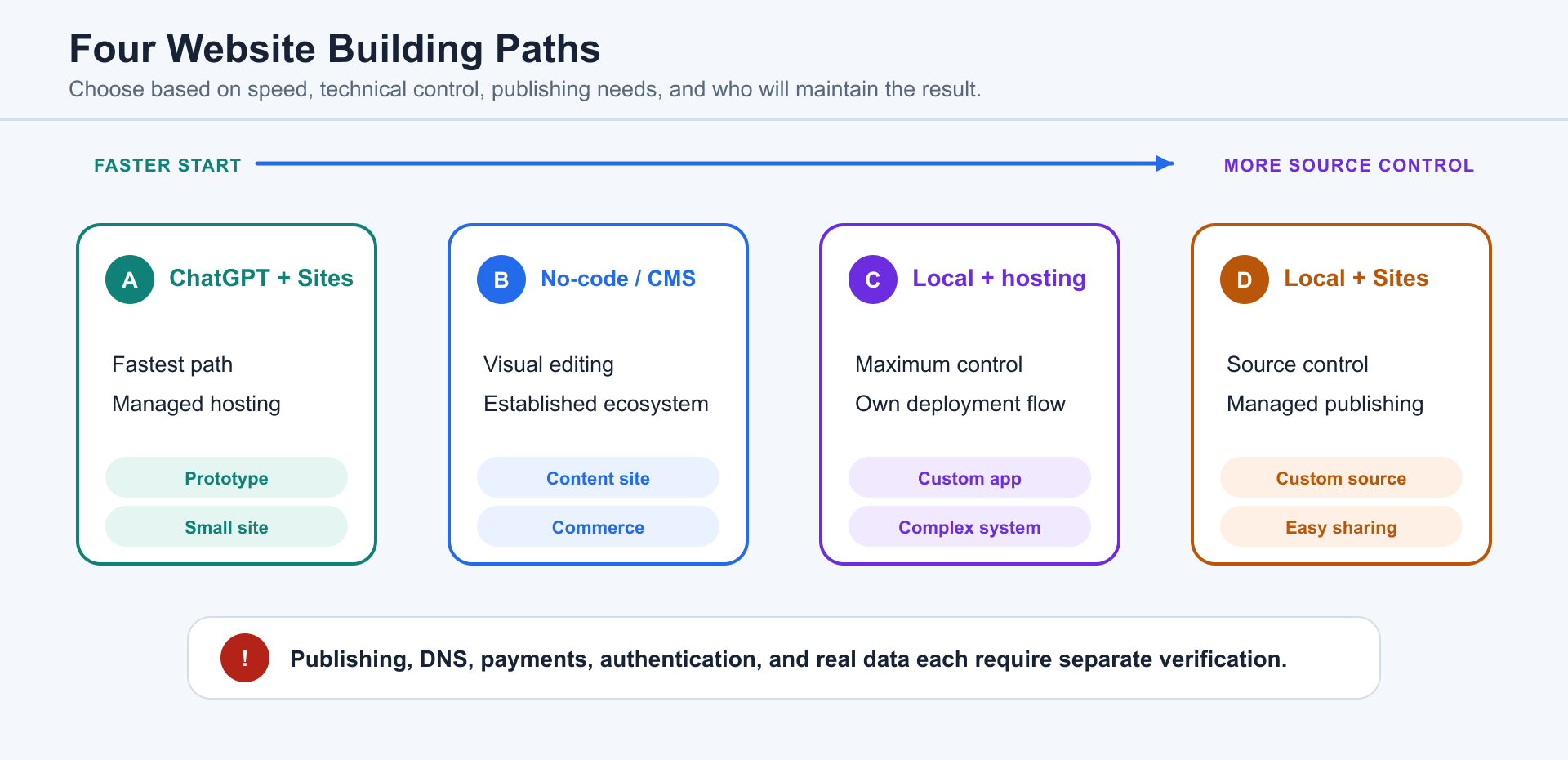
Every Sites deployment URL should be treated as a production deployment. When review is required, ask ChatGPT to save a version without deploying it. Review generated content, authentication, data behavior, links, forms, permissions, and sensitive information before publishing.
Field Note: What the Penguin Post Prototype Teaches
Section titled “Field Note: What the Penguin Post Prototype Teaches”A privately published Sites address such as penguin-post-toys.kent2001.chatgpt.site is a platform-managed subdomain. It gives the creator a working address, but it is not the same as owning kent2001.chatgpt.site through a domain registrar. The practical rule is simple: hosting access and domain ownership are separate. If a long-term brand identity matters, buy and control a domain through a registrar, then use the custom-domain options supported by the hosting workflow. Confirm the current DNS and HTTPS instructions in the product before changing records.
Sites is useful for moving quickly from an idea to a responsive prototype. In the Penguin Post example, the first version included product cards, prices, customer reviews, and an interactive shopping bag. That made the idea easy to see and share, but the visible interface did not prove that a complete commerce system existed behind it. The bag could still be browser-only state, disappear on refresh, and have no real order, payment, inventory, or database connection.
Take Control of the UI Through Source Code
Section titled “Take Control of the UI Through Source Code”A Sites project can be controlled through its underlying web source rather than only through natural-language descriptions. In a typical React or Next.js project, page structure and interaction live in files such as app/page.tsx, global styling lives in app/globals.css, metadata and shared layout live in app/layout.tsx, and images or icons live in public/. The exact project path and filenames should be confirmed in the active workspace instead of assumed from a published URL.
For precise visual work, use browser developer tools to test spacing, color, typography, and responsive rules, then copy the approved values back into the source. A Figma design can provide a more formal target. A small design system can centralize brand color, text color, background, border radius, spacing, and content width as variables or tokens. A CMS or admin interface can later control product content, but exact layout and interaction still belong in design and code.
Move From Prototype to a Domain and Production Stack
Section titled “Move From Prototype to a Domain and Production Stack”Before migration, identify what you actually possess: the source project, the Sites project binding, the deployed version, the assets, and any data. A published subdomain by itself is not a portable code package. Keep the source in a local project and version-control repository, document build and environment settings, and verify that images, fonts, routes, and forms work on a preview deployment before switching DNS to a domain you own.
Treat the Sites version as a prototype until each production capability is implemented and verified. Product administration needs authenticated roles, input validation, and an audit trail. Persistent carts and orders need server-side APIs and a managed production database. Payments should use a specialist provider’s hosted or tokenized flow, with verified webhooks; the site should not store raw card details. These additions change the risk profile substantially.
A useful handoff prompt is: “Inspect this Sites project and tell me which features are visual prototypes and which have real persistence. Identify the source files that control the UI, explain how to run the project locally, list what must change before I connect my own domain, and do not deploy or modify DNS until I approve the plan.”
The right choice depends on the product shape, editing workflow, maintenance owner, data requirements, deployment policy, and the amount of technical control the team needs—not on which stack sounds most modern.
5.7 Building a Small App, Script, or Automation
Section titled “5.7 Building a Small App, Script, or Automation”An app is different from a simple website because it usually has behavior and state. It may let users create tasks, save notes, upload files, filter records, calculate results, or return later to continue work. Even a tiny app has more moving parts than a brochure site.
Beginners should start with a local or low-risk app. Good first examples include a calculator, habit tracker, flashcard tool, file renamer, CSV cleaner, image organizer, or personal dashboard. Python is often friendly for scripts and data tasks. Node.js is useful for command-line tools and web servers. TypeScript is useful when the app grows and you want clearer structure around data and components.
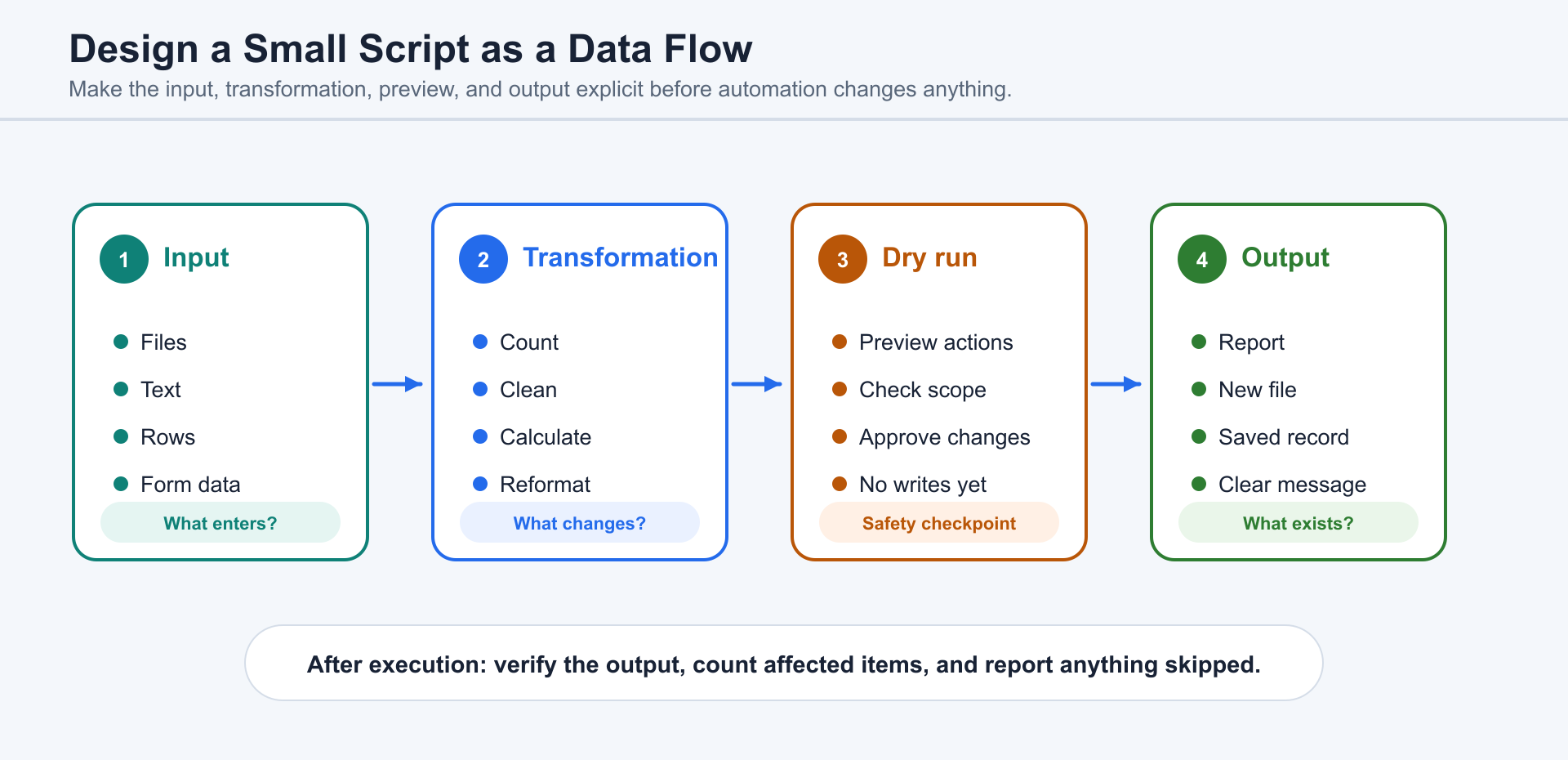
The key is to describe input, transformation, and output. Input means what the app receives: files, text, rows, images, numbers, or form entries. Transformation means what should happen to that input. Output means what should be produced: renamed files, a CSV, a report, a folder, a chart, a saved record, or a message.
A strong beginner prompt might say: “Create a Python script that counts how many .jpg files are directly inside my Downloads folder, not including subfolders. Do not modify any files. Explain the command before running it.” Another might say: “Create a small local task app with add, complete, and filter features. Use simple storage first. Do not add login, payments, or cloud deployment yet.”
For automations, ask for dry-run mode. Dry-run means the script shows what it would do before actually doing it. This is especially important for file renaming, deletion, uploads, email sending, or any action that affects many items.
5.8 Learning Programming Through Conversation
Section titled “5.8 Learning Programming Through Conversation”ChatGPT can help you learn programming because it can answer questions at the moment confusion appears. You can interrupt with questions such as: “Why is this line needed?” “What does this error mean?” “Can you show the same idea in Python and JavaScript?” “What would the TypeScript version protect me from?”
A good learning prompt asks ChatGPT to teach without taking over: “Guide me through this change step by step. Do not do everything at once. Ask me to predict what will happen, then explain the answer.” When the lesson moves into a real repository, Codex can make or verify the implementation while preserving the teaching loop.
Comparisons are especially helpful. Ask ChatGPT to compare a WordPress page, a static HTML page, and a React/TypeScript page, or a Python script and a Node.js script that solve the same problem. Ask for a beginner version and a professional version so abstract ideas become concrete.
The danger is passive learning. If AI writes everything and you never ask why, you may finish a task without gaining understanding. Ask ChatGPT for short explanations, predict outcomes, make small edits yourself, and request a quiz on the code. If Codex performs project changes, review the diff and the commands it ran.
5.9 Knowing When You Need Expert Help
Section titled “5.9 Knowing When You Need Expert Help”ChatGPT and Codex can expand what beginners can do, but neither replaces expert judgment in high-risk situations.
You should involve an experienced developer when the work affects user accounts, authentication, payments, private data, legal records, medical information, financial decisions, production infrastructure, security settings, or large databases. These areas have hidden risks. A change may appear to work while creating a vulnerability, data loss, compliance issue, or maintenance problem.
You should also ask for help when Codex repeatedly fails to fix the same problem, when you do not understand the proposed change, when the project has no tests, or when the fix requires changing many files you cannot review. Repetition without understanding is a warning sign.
A useful expert handoff includes context. Ask Codex to prepare a short summary: goal, current behavior, error messages, files inspected, changes attempted, commands run, platform details, and remaining questions. This makes it easier for a human expert to step in quickly.
The beginner’s responsibility is not to know everything. It is to keep the work bounded, ask for explanations, verify results, and recognize risk. Used this way, Codex can help you build small things, understand existing things, and learn enough to ask better questions the next time.
5.10 Preventing Fake Test Results and Made-Up Data
Section titled “5.10 Preventing Fake Test Results and Made-Up Data”Beginners do not need to become testing experts, but they do need one habit: ask where the evidence came from. Request the exact command, the important output, and whether the check used real, recorded, sample, or mocked data.
A beginner-safe prompt is: “Show me the failure first. Do not change the test or invent data merely to make it pass. After the fix, show the command, output, changed files, and anything still unverified.”
The full engineering treatment of test provenance and false verification belongs to Chapter 6. The general evidence standard belongs to Chapter 13.
5.11 Beginner, Creator, Developer, and Team Paths
Section titled “5.11 Beginner, Creator, Developer, and Team Paths”Learning paths organize the next useful step; they are not permanent identities. Choose the path that matches the problem you are solving now, then move between paths as the work changes.
- Beginner path: start with a conversation, work with a small set of files, give a clear task, review the result, and complete one small project.
- Creator path: use ChatGPT and appropriate creative tools for research, writing, images, presentations, publishing, and artifact review.
- Developer path: read a codebase, implement a bounded requirement, run tests, review the diff, and handle complex tasks through plans and evidence.
- Team path: share project instructions, quality standards, review ownership, repeatable automation, and the canonical permission rules in Chapter 13.
The beginner sequence is deliberately small: conversation establishes the goal, files provide concrete context, a clear task creates boundaries, review catches mistakes, and the first project turns isolated prompts into a complete workflow.