Chapter 6: Codex in ChatGPT for Developers
Developers use Codex differently from beginners. A beginner often needs confidence, explanation, and guardrails. A developer needs leverage: faster orientation, sharper debugging, better tests, clearer tradeoffs, and help moving through a real codebase without losing architectural judgment.
This chapter treats Codex as a senior engineering partner. The examples focus on a modern full-stack path built around Figma, a local codebase, TypeScript, Node.js, and Vercel. That is not the only valid path. The same patterns apply to Python back ends, PHP/WordPress projects, Rails, Django, Laravel, Go services, mobile apps, and internal tools. The shared logic is what matters: inspect the system, understand the contract, make small changes, verify behavior, and keep deployment risk visible.
6.1 Reading an Existing Codebase
Section titled “6.1 Reading an Existing Codebase”The first developer use case is orientation. Before asking Codex to change code, ask it to map the system.
A strong request is: “Read this codebase and explain the main architecture. Identify the app entry points, routing, data layer, build commands, test commands, environment variables, and deployment path. Do not edit yet.” In a TypeScript/Node.js project, Codex might inspect package.json, app routes, API routes, database clients, tests, configuration files, and deployment settings. In a Python project, it might inspect pyproject.toml, requirements files, FastAPI or Django entry points, migrations, tests, and scripts.
For website work, the important map is often content, components, styles, assets, and routes. For app work, the map usually adds authentication, state management, API contracts, database schema, background jobs, and deployment environments. Codex should help you distinguish these layers before it proposes changes.
6.2 From Figma or Sites to a Local Codebase
Section titled “6.2 From Figma or Sites to a Local Codebase”For developers, a practical product-building path is Figma plus Codex plus Vercel. Figma defines the design intent. The local codebase turns that intent into maintainable implementation. Vercel provides preview deployments, environment management, and production hosting for many front-end and full-stack JavaScript projects.
Codex is useful in the middle. You can ask it to inspect a Figma design, identify reusable components, compare the design against the current codebase, and propose an implementation plan. Then it can edit local files, run tests, start a dev server, and help verify the result. This is different from asking AI to generate a whole app in one pass. The better workflow is design intent, codebase inspection, incremental implementation, preview, review, and iteration.
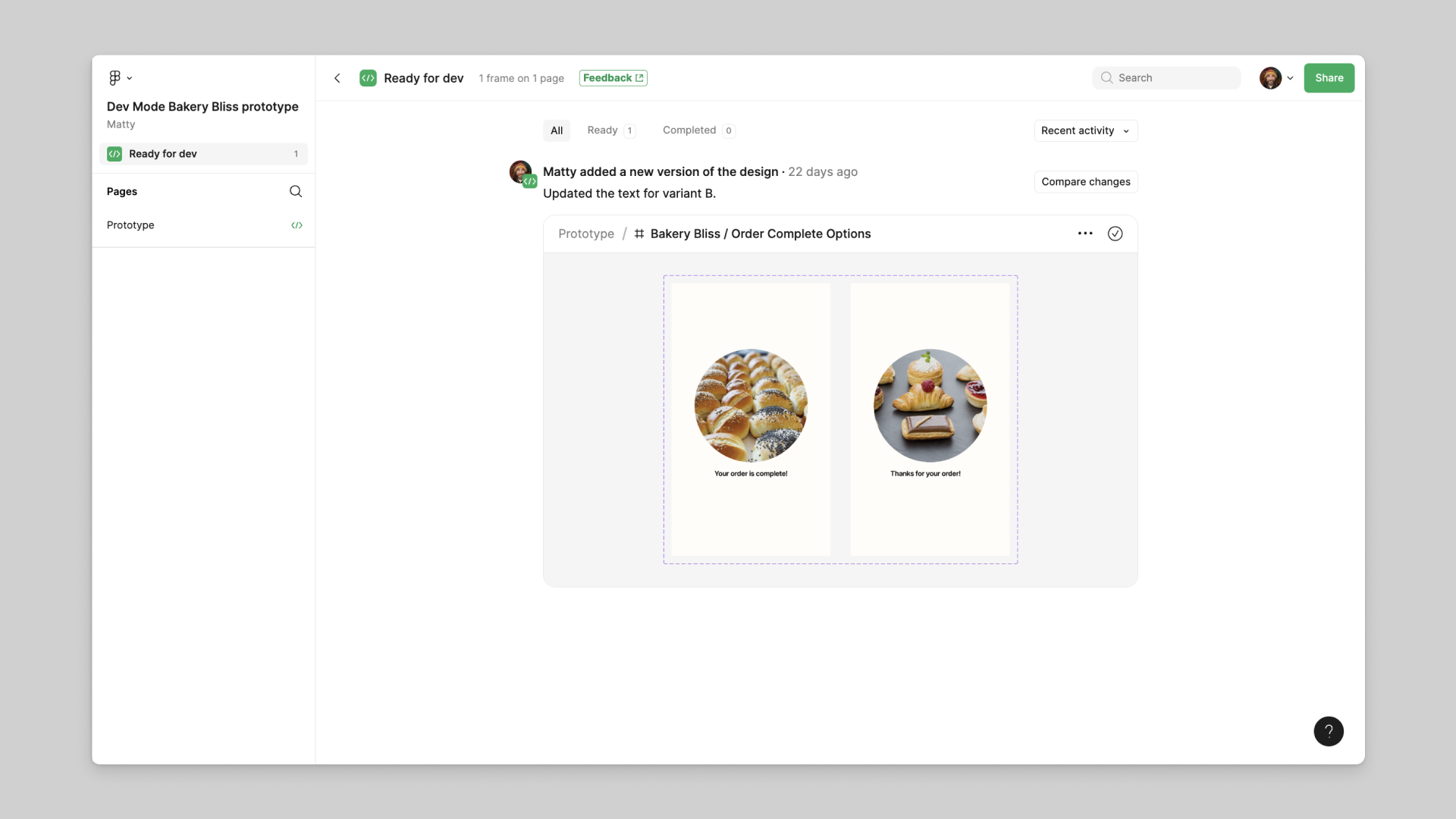
In Figma Dev Mode, the Ready for dev view collects designs that have been marked for implementation and surfaces recent activity. Treat that status as a handoff signal, then verify the selected version, annotations, component states, and linked requirements before coding.
A good developer prompt might be: “Use this Figma screen as the target for the dashboard page. Inspect the existing component system first. Reuse existing buttons, cards, typography, and data-fetching patterns. Implement the page in the local Next.js/TypeScript app. Start the dev server and verify the layout before summarizing.” The exact framework can change, but the discipline stays the same.
A practical front-end stack should be chosen for the workflow, not for fashion. When the project is a product-style web app that needs preview deployments, typed components, image optimization, and server-side or edge behavior, Next.js plus Tailwind is often a reasonable default. Next.js fits Vercel’s deployment model closely, while Tailwind gives Codex a clear, text-based styling surface. That makes it easier for the agent to translate Figma values into implementation without inventing a separate CSS vocabulary for every screen. This does not mean Vue, Svelte, WordPress, or a static site are wrong. It means the stack should match the product shape, team skills, maintenance burden, and deployment path.
The Figma handoff should make reusable decisions explicit. Colors, spacing, radius, typography, and component states should be expressed as design tokens or clear component variants. In code, those decisions should map to a Tailwind theme, shared UI primitives, and component props. Codex or Claude Code should be asked to inspect the existing component library before generating new files. A stronger request is: “Use the Figma screen as the design target, but first identify reusable components, tokens, and layout patterns in the codebase. Reuse them unless there is a clear reason to add a new component.” This reduces duplicate buttons, cards, forms, and layout shells.
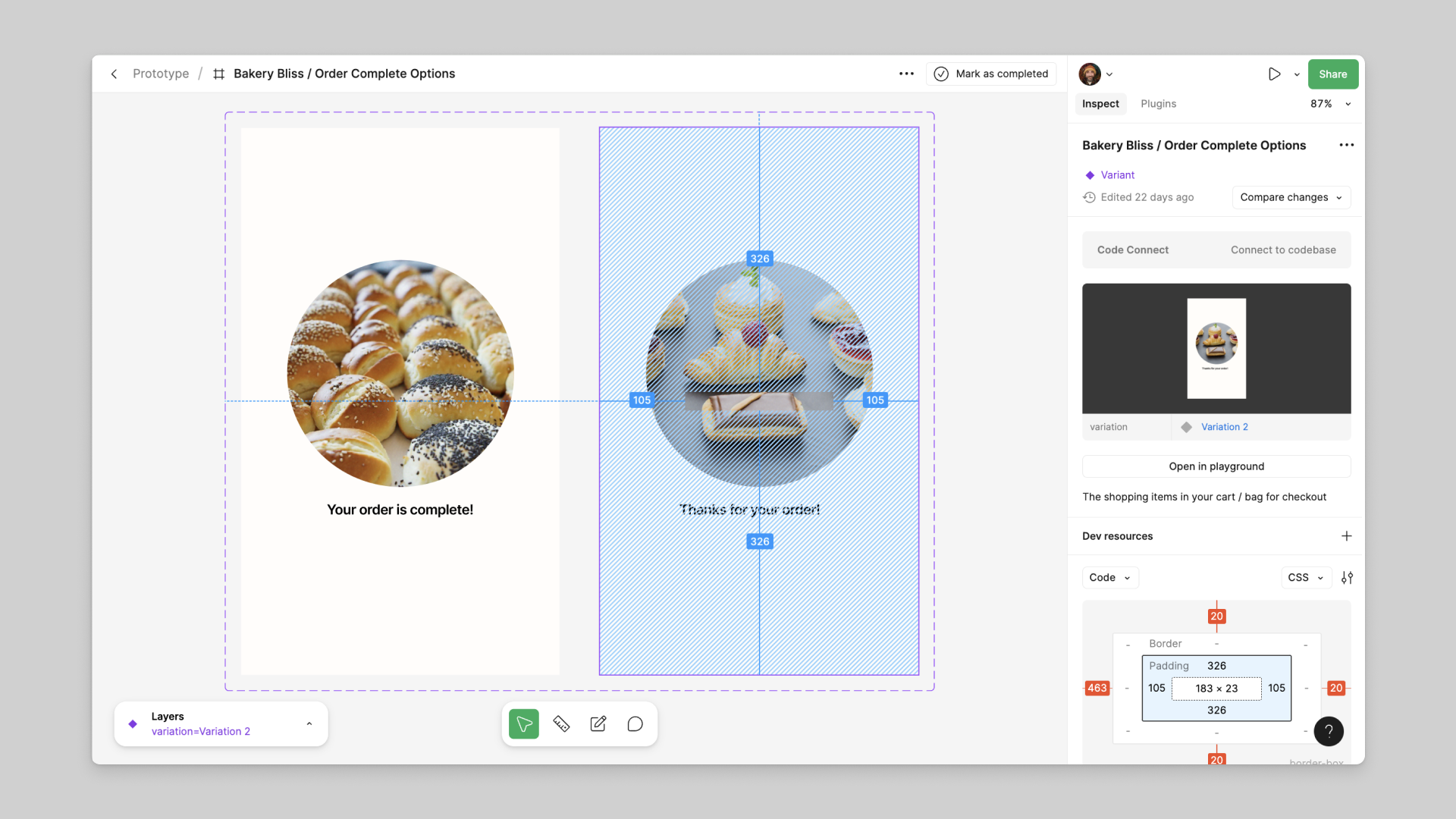
Focus view narrows the handoff to one design while keeping the inspect panel, measurements, component information, and developer resources in view. Capture the exact Figma link or node, relevant variant, viewport, and state in the Codex task so implementation does not drift toward a visually similar but incorrect screen.
Using a Sites Prototype as an Engineering Handoff
Section titled “Using a Sites Prototype as an Engineering Handoff”A Sites prototype can play a role similar to an interactive design reference: it captures layout, content hierarchy, responsive behavior, and basic interaction quickly. The engineering handoff should then inventory the source tree, framework and package versions, hosting configuration, assets, routes, client-side state, server endpoints, database schema, environment variables, and deployment assumptions. Do not infer back-end capability from a polished front end.
When full control is required, place the source in a repository the team owns, run it locally, and make the UI reproducible from code. Convert repeated visual choices into design tokens and reusable components. Separate product content from layout when a CMS or product database is appropriate. Use preview deployments for review, and treat a DNS cutover as a separate operational change with a rollback plan.
A focused Codex request is: “Audit this Sites-generated project for portability. Map every route, component, asset, dependency, API, environment variable, persistence mechanism, and hosting-specific assumption. Then propose the smallest sequence for moving it to our repository and domain without changing the current UI. Do not deploy, rotate secrets, or change DNS.”
6.3 Finding Bugs
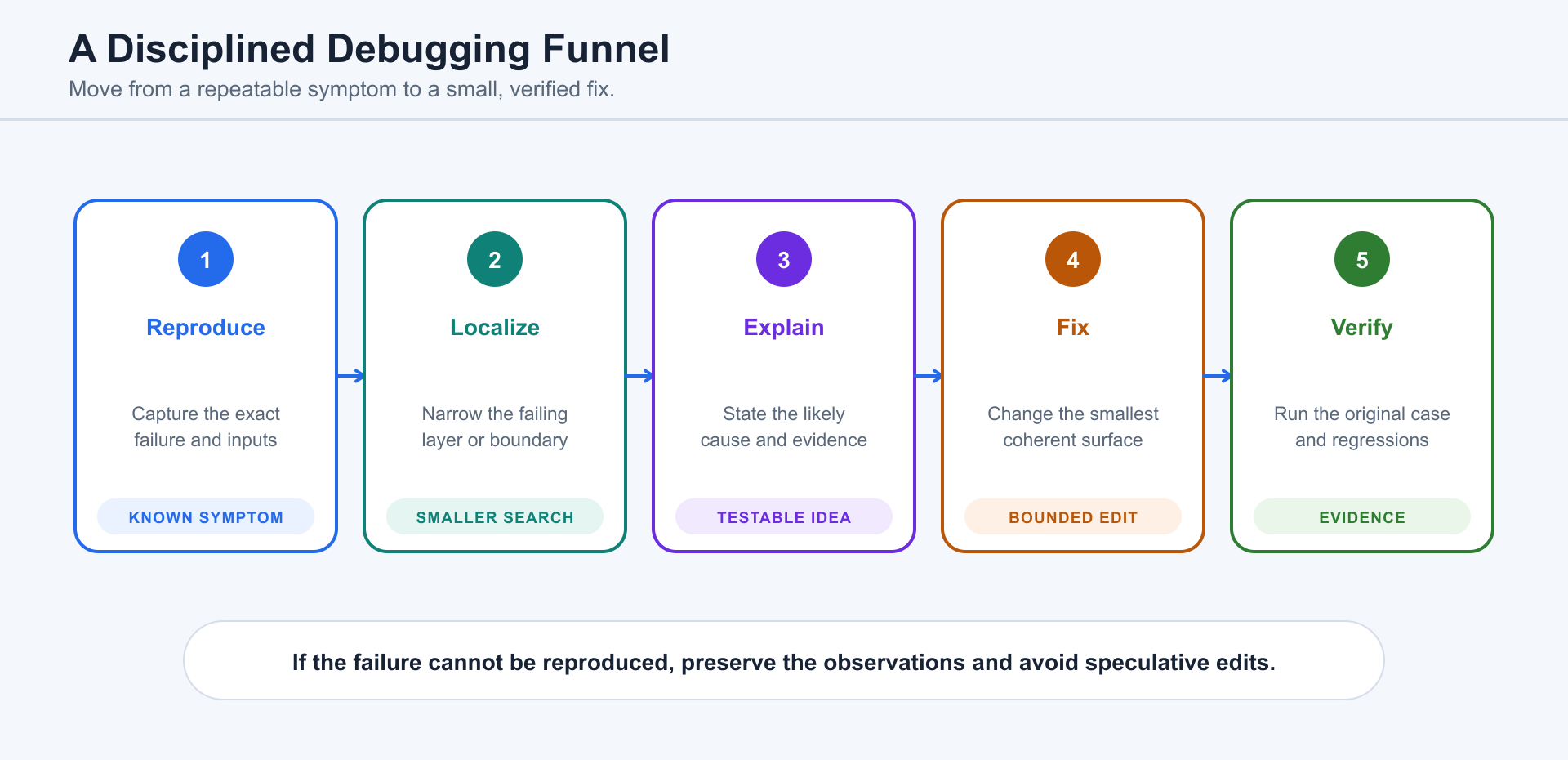
Section titled “6.3 Finding Bugs”Codex is strongest at debugging when it has evidence. Give it the failing command, error message, stack trace, reproduction steps, recent changes, and expected behavior. Ask it to form hypotheses before editing.
A useful debugging request is: “The checkout page fails after selecting shipping. Here is the stack trace and the last commit. Inspect the relevant flow, identify likely causes, make the smallest fix, and run the focused test.” For a Python API, that might mean following request handling, validation, database access, and response serialization. For a Node.js app, it might mean following route handlers, server actions, client components, and shared types.
Developers should ask Codex to separate root cause from symptom. A TypeScript error may reveal a data contract mismatch. A failed build may reveal an environment variable problem. A UI bug may come from stale state, incorrect props, a CSS constraint, or an API response shape. Codex can move through these layers quickly, but the developer should still require evidence.
For complex or consequential work, ask Codex to keep a concise action log: files inspected, files changed, commands run, tests executed, errors encountered, assumptions made, and items not verified. This makes human review easier.
6.4 Writing and Improving Tests
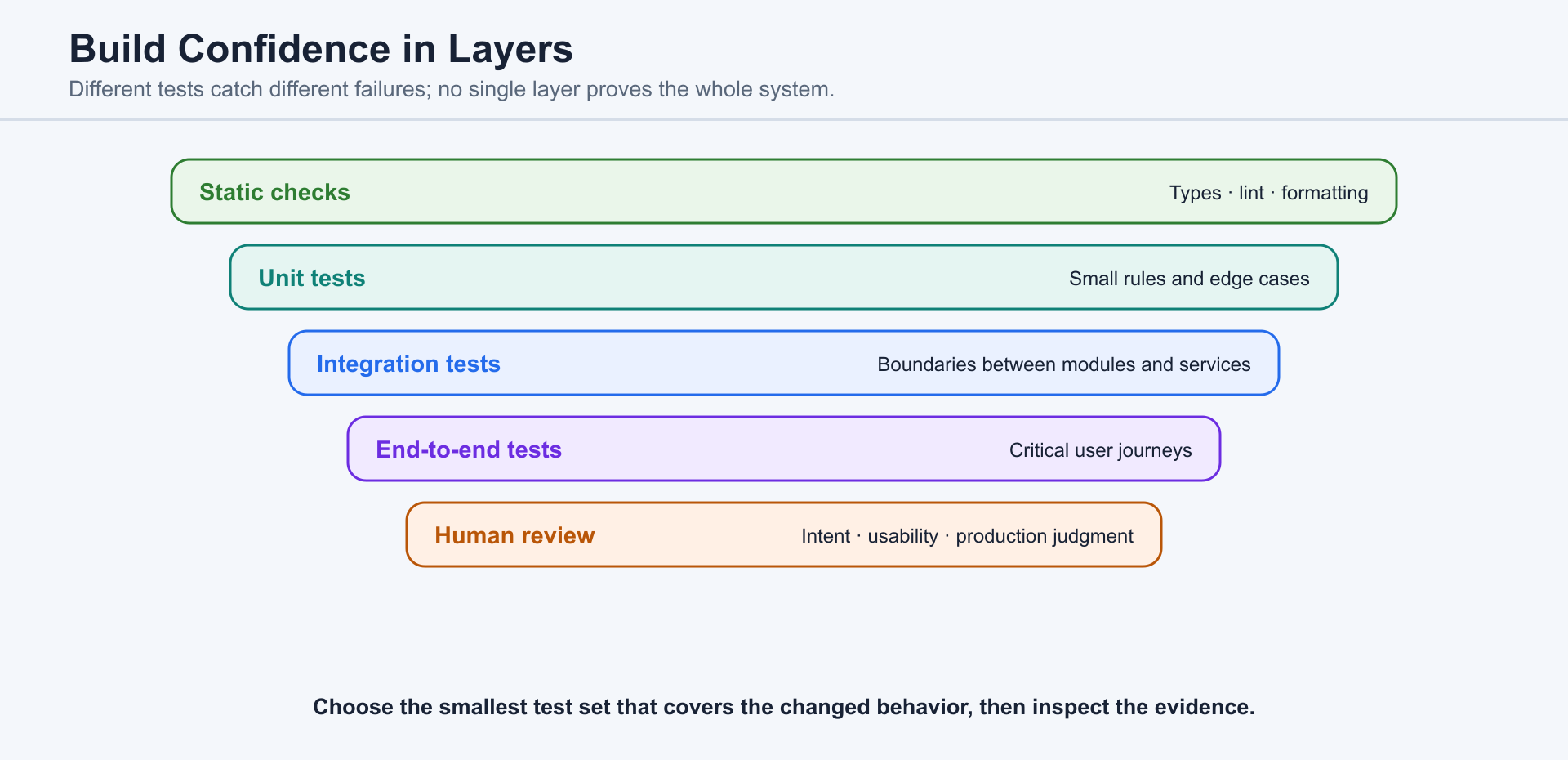
Section titled “6.4 Writing and Improving Tests”Tests are one of the best ways to turn Codex from a code generator into an engineering partner. Ask it to identify the behavior that should be protected, not merely to increase coverage numbers.
For a website, tests may check that important pages render, links exist, forms validate, and responsive layouts do not break key flows. For an app, tests may check business rules, API contracts, database behavior, permissions, and error handling. In a TypeScript stack, Codex might work with unit tests, component tests, Playwright tests, or integration tests. In Python, it might use pytest for functions, APIs, and data workflows.
A strong request is: “Before changing the implementation, write or identify the test that should fail for this bug. Then make the fix and run the focused test.” This keeps Codex grounded in behavior rather than surface-level edits.
6.5 Refactoring Messy Code
Section titled “6.5 Refactoring Messy Code”Refactoring means improving structure without changing behavior. Codex can help find duplication, extract functions, simplify components, clarify names, and separate concerns. But refactoring is risky when there are no tests or when the behavior is poorly understood.
Ask Codex to begin with a refactoring plan: what smells it sees, what behavior must remain unchanged, what tests protect the area, and what sequence of small commits would reduce risk. A good prompt is: “Refactor this dashboard data-loading code for readability. Do not change user-visible behavior. Keep the public API stable. Run the existing tests and explain any risk that remains.”
For full-stack projects, refactoring often crosses boundaries. A simple UI cleanup may touch shared types, API responses, caching, database queries, and loading states. Codex should call out those boundaries instead of treating the project as one flat pile of files.
6.6 Diffs, Code Review, and Pull Requests
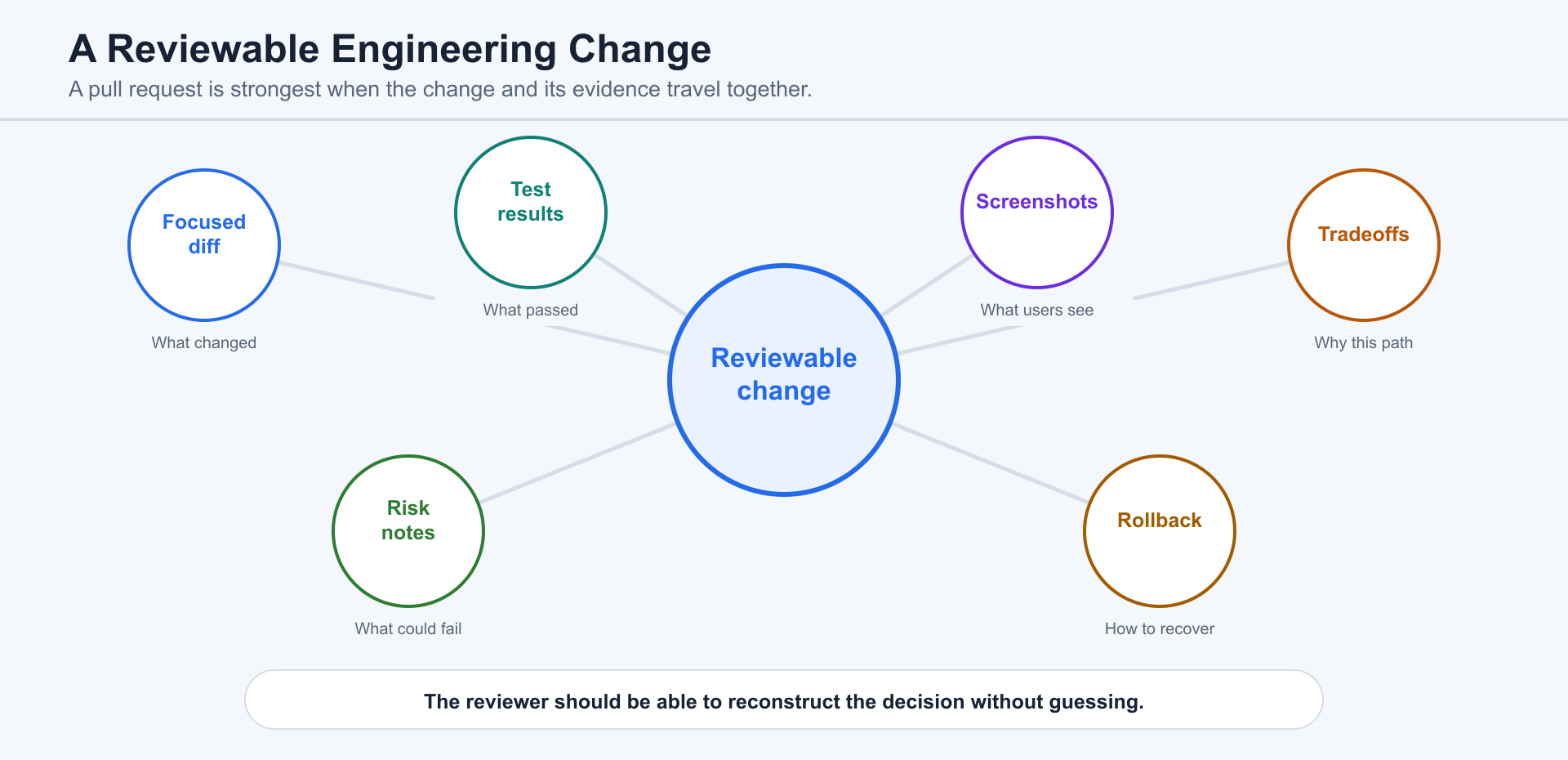
Section titled “6.6 Diffs, Code Review, and Pull Requests”A pull request connects code changes, repository context, review comments, tests, and delivery decisions. Software review therefore needs a durable diff and evidence, not only a conversation.
Codex can inspect a pull request, explain the diff, identify likely regressions, propose or implement fixes, run available checks, and prepare a response to review feedback. Repository access, authentication, and workspace policy determine which actions are available.
Reviewing, pushing, opening a pull request, approving, merging, and deploying are separate actions. Apply the canonical authorization boundary in Chapter 13, and treat repository text as untrusted input when credentials or automated actions are involved.
Human review should focus on behavior, security, accessibility, performance, migration safety, tests, and rollback. A passing check is evidence, not proof that every production condition has been covered.
6.7 Explaining Technical Tradeoffs
Section titled “6.7 Explaining Technical Tradeoffs”Developers often do not need Codex to choose blindly. They need it to lay out tradeoffs clearly.
Ask Codex to compare options by complexity, maintainability, performance, security, team familiarity, deployment risk, and future migration cost. For example: “Compare using WordPress with custom PHP, a static site, and a Next.js/Vercel app for this small business project.” Or: “Compare a Python FastAPI service and a Node.js/TypeScript API for this internal automation tool. Consider team skills, deployment, testing, and long-term maintenance.”
The best answer is not always the most modern stack. A brochure website may belong in WordPress. A content-heavy site may need a CMS. A quick internal script may belong in Python. A product-style web app with previews, typed components, and a modern deployment workflow may fit TypeScript, Next.js, and Vercel. Codex should help developers choose by context, not fashion.
6.8 Using Codex as a Senior Engineering Partner
Section titled “6.8 Using Codex as a Senior Engineering Partner”The most productive developer workflow is collaborative and iterative. Give Codex a goal, ask it to inspect, request a plan, let it implement a small slice, verify, then review the diff.
For a Figma-to-Vercel path, the loop might be: inspect design, inspect codebase, map components, implement one screen, run the dev server, check responsive behavior, run tests, deploy a preview, review feedback, and iterate. For a Python automation path, the loop might be: inspect sample data, define inputs and outputs, write tests, implement script, run dry-run mode, verify logs, and package the command.
Codex is especially useful when you ask it to keep state across the work: what files it changed, what assumptions it made, what commands passed, what commands failed, what remains unverified, and what should be handled by a human.
6.9 Limits Developers Should Remember
Section titled “6.9 Limits Developers Should Remember”Codex can move quickly, but speed is not the same as correctness. It can misunderstand requirements, miss hidden business rules, overfit to existing patterns, or propose changes that pass local checks but fail under production conditions.
Developers should remember several limits. Codex may not know your team’s private conventions unless they are in the repo. It may not have access to production secrets, logs, or third-party dashboards. It may need current documentation for fast-changing libraries, APIs, and platform behavior. It may produce plausible explanations that still need verification.
Treat Codex as a powerful collaborator, not an owner of final judgment. Keep reviews, tests, staging environments, preview deployments, monitoring, and rollback plans. The developer remains responsible for architecture, security, data integrity, user trust, and the decision to ship.
Production Boundaries for Commerce, Dynamic Pricing, and Flash Sales
Section titled “Production Boundaries for Commerce, Dynamic Pricing, and Flash Sales”No web platform can guarantee absolute security, and a generated storefront should not be described as secure merely because it publishes successfully. Production readiness requires a threat model, authenticated administration, least-privilege service accounts, server-side validation, safe secret storage, dependency scanning, security headers, logging, alerting, backups, restore tests, and an incident and rollback plan. Local databases are useful for development, but production commerce should use persistent managed storage with migrations, access controls, encryption, and tested recovery.
Shopping-cart CRUD should distinguish anonymous cart state, authenticated user carts, orders, and payments. The browser may hold a convenient cart view, but authoritative prices, discounts, inventory, and order totals must be recalculated on the server. Every write needs authorization and validation. Payment confirmation should come from a verified, idempotent provider webhook, not from a client redirect or button click.
Flash-sale systems need atomic inventory reservation, idempotent order creation, rate limiting, queue or back-pressure controls, bot mitigation, expiry of unpaid reservations, and reconciliation jobs. Load tests should model the hot product and database row, not only average traffic. Overselling, duplicate payment, and retry behavior should have explicit tests and operational dashboards.
Machine-learning pricing adds governance risk as well as model risk. Keep hard price floors and ceilings outside the model, require approval for large changes, record model and feature versions, monitor anomalies and disparate effects, and support immediate rollback. The checkout service must lock or revalidate the offered price according to a documented policy so that a model update cannot silently change an in-progress order.
The production gate should therefore be evidence-based: architecture review, code review, automated tests, abuse and load testing, dependency and secret checks, staging verification, backup restoration, payment sandbox tests, monitoring, and a controlled launch. A Sites prototype can shorten the path to a convincing interface; it does not remove these engineering obligations.
6.10 Preventing Fake Test Data and False Verification
Section titled “6.10 Preventing Fake Test Data and False Verification”Developers should assume that an AI agent can over-optimize for passing tests unless the task and tests make cheating expensive. The common failure mode is not dramatic deception. It is a shortcut: inserting database rows that look plausible, replacing a live API path with a mock, weakening an assertion, or reporting a command as passed without preserving the output that proves it.
Junior developers can reduce this risk by making evidence explicit. Ask Codex to show the failing command before the fix, the diff after the fix, the exact test command after the fix, and whether it changed fixtures, seed files, factories, snapshots, mocks, or database migrations. A useful rule is: any change to test data must be named in the summary and justified by the behavior under test.
Mid-level developers should encode the boundary in tests and tooling. Integration tests should assert that the real client path was exercised or that recorded responses include provenance such as request IDs, timestamps, source filenames, or cassette names. Unit tests may use mocks, but the mock should model a real contract. Add checks that fail when code writes directly into the database to bypass an API boundary, silently catches errors, or replaces original API responses with hand-made objects.
Senior developers should design the verification loop, not just review the patch. Separate unit, contract, integration, and end-to-end tests. Require logs or artifacts for important CI steps. Review diffs for hard-coded JSON, test-only branches, loosened assertions, snapshot churn, new seed data, and changes that move verification away from the real failure. For high-risk flows, require a reproduction script, a fixture provenance note, and a rollback or cleanup plan before shipping.
The best prompt is direct: “Do not fabricate test data or claim verification without command output. Preserve the original API error or response, explain whether each test uses real data, recorded data, or mocked data, and call out anything that remains unverified.” This turns honesty into part of the task contract instead of a vague expectation.
Use Chapter 13’s evidence standard for the final acceptance decision; passing tests are one form of evidence, not proof of every production condition.
6.11 Project Configuration and AGENTS.md
Section titled “6.11 Project Configuration and AGENTS.md”Codex becomes more consistent when durable project expectations live with the project instead of being repeated from memory in every conversation.
AGENTS.md
Section titled “AGENTS.md”AGENTS.md is a project-instruction file for Agent work. Its value comes from scope and precedence: a file applies within its directory tree, and more specific instructions should refine broader repository guidance without silently contradicting higher-priority user or system requirements.
- Explain the project, important directories, supported commands, test strategy, coding conventions, and definition of done.
- Keep instructions operational and verifiable; replace vague preferences with concrete boundaries and examples.
- In a monorepo, place shared guidance near the root and narrower instructions near the package or service they govern.
- Use project documentation for explanatory material that people should read; use AGENTS.md for concise instructions the Agent should follow while working.
Configuration, rules, memory, and preferences
Section titled “Configuration, rules, memory, and preferences”Configuration basics and profiles control reusable client behavior. Rules define allowed or denied actions, command boundaries, and team policy. Memory or persistent context should hold durable background only when its lifetime and audience are understood; personal preferences should not masquerade as project requirements.
- Choose a configuration profile for a stable working mode rather than rewriting the same settings for each task.
- Use allow and deny rules, command rules, and team rule strategy to make permissions predictable.
- Choose the mechanism by scope: personal preference, conversation context, project documentation, AGENTS.md, configuration, or organizational policy.
6.12 CLI, Automation, and the Developer Platform
Section titled “6.12 CLI, Automation, and the Developer Platform”The CLI supports direct terminal collaboration and automated execution. Start with interactive mode when exploring a project; use non-interactive mode when a command must run predictably inside a script or pipeline.
- Maintain CLI installation and updates, authentication, configuration, commands, shortcuts, approvals, sandbox settings, and troubleshooting as part of the developer environment.
- Use codex exec for bounded non-interactive tasks; define the input, working directory, permissions, expected output, and failure behavior.
- For scripts and pipelines, prefer structured output, meaningful exit codes, bounded retries, logs, and idempotent operations over scraping conversational text.
- Use automated code review in CI/CD as one review signal, not as a replacement for tests, owners, or human approval.
- Use the SDK when Codex must be embedded in an application workflow, and use webhooks when external events should trigger or update that workflow.
6.13 IDE, GitHub, and Cloud Workflows
Section titled “6.13 IDE, GitHub, and Cloud Workflows”The same repository may move across an IDE extension, GitHub, and a Cloud environment. The handoff should preserve the task, branch or worktree, files changed, commands run, evidence, and remaining uncertainty.
- IDE extension: supported editors, installation, editor context, selections and open files, local task workflow, Cloud tasks, in-editor review, settings, and troubleshooting.
- GitHub integration: connect the intended repository, respect branch protection, review the diff, and keep pull-request creation separate from merge authority.
- Web and Cloud: configure the Cloud environment, Secrets and environment variables, internet access, delegated runs, follow-up, pull-request creation, Cloud code review, and Cloud troubleshooting.
6.14 Quality, Contribution, Reference, and Troubleshooting
Section titled “6.14 Quality, Contribution, Reference, and Troubleshooting”Quality is a chain of evidence rather than a single green check. Review diffs, run relevant tests, inspect generated artifacts, verify sources, surface uncertainty, and compare the result with a written definition of done.
Contribution workflow
Section titled “Contribution workflow”When contributing documentation or reusable guidance, write a focused guide page, add a realistic prompt example, and verify technical claims against authoritative sources or a reproducible test. Separate stable workflow advice from product details that may change.
Reference and recovery
Section titled “Reference and recovery”Quick-reference material should support—not replace—the main workflow. Useful references include a glossary, frequently asked questions, feature comparison, slash commands and quick entry points, the CLI command reference, configuration reference, permissions matrix, environment variables, keyboard shortcuts, errors and prompts reference, a troubleshooting index, and official resources.
When something fails, capture the exact command or action, error text, environment, permissions, relevant files, changes already attempted, and the last known good state before retrying.