Chapter 4: How to Work With ChatGPT
Talking to ChatGPT is not about memorizing magic words. It is about giving a capable system enough direction to do useful work, enough context to avoid guessing, and enough feedback to improve the result. A good prompt is not a spell. It is a work order.
This chapter explains that work order in a practical way. It is written for two kinds of users at the same time. Beginners need a simple method that works even when they do not know technical vocabulary. Technical users need a more rigorous method that can control files, tools, tests, constraints, and verification. Both groups need the same foundation: clear goals, grounded context, explicit constraints, visible reasoning, and review.
It is also written for users who may not think in English first. ChatGPT can work with many languages, but English is still common in software, documentation, error messages, APIs, and technical communities. A non-English speaker, for example, may want to explain the goal in a native language, preserve English code terms, ask ChatGPT to draft bilingual instructions, or translate a local business idea into an English technical specification. Good communication with ChatGPT is therefore not only about prompting. It is also about managing language, meaning, and precision.
4.1 The Core Logic of Working With ChatGPT
Section titled “4.1 The Core Logic of Working With ChatGPT”The simplest formula is: goal, context, constraints, output, verification. Figure 4.1 shows why these five parts work together: each part removes a different kind of uncertainty.
The goal tells ChatGPT what you want to accomplish. The context tells it what situation it is working in. The constraints tell it what must not change, what style to follow, what tools to use, or what risks to avoid. The output tells it what finished work should look like. Verification tells it how the result should be checked.
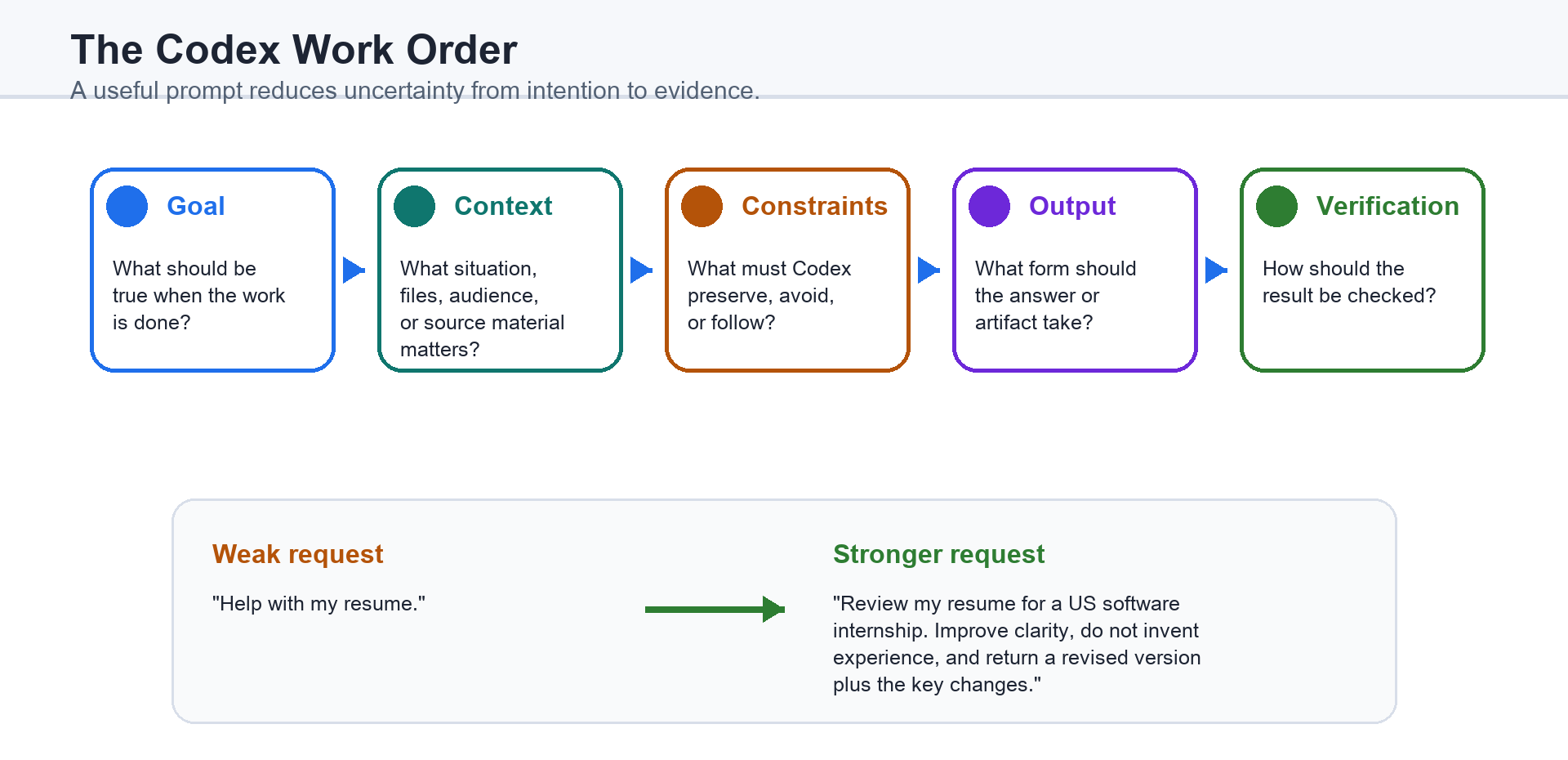
For a beginner, this formula can be plain English: “Help me improve this chapter for readers who are new to AI. Keep the tone friendly. Do not make it too technical. Give me a revised version and explain the main changes.” That is already a strong instruction because it names the task, audience, tone, boundary, and output.
For a technical user, the same logic becomes more operational: “Inspect the repository before editing. Modify only the files needed for the login bug. Preserve the existing architecture. Add or update tests. Run the relevant test command. Summarize the root cause, files changed, and verification result.” This is not longer because technical users enjoy complexity. It is longer because the task has more ways to go wrong.
The deeper principle is that ChatGPT works best when the instruction reduces uncertainty. If the goal is vague, ChatGPT must infer the goal. If the context is missing, it must guess the situation. If the constraints are absent, it may change too much. If the desired output is unclear, it may produce the wrong form. If verification is not defined, it may stop too early.
4.2 Begin With the Outcome, Not the Perfect Prompt
Section titled “4.2 Begin With the Outcome, Not the Perfect Prompt”Many new users worry that they do not know how to write the perfect prompt. This worry is understandable, but it points in the wrong direction. Start with the outcome instead.
Ask yourself: what should exist when the work is finished? A clearer email? A fixed bug? A comparison table? A study plan? A working webpage? A translated document? A set of next actions? Once the outcome is visible, the prompt becomes easier.
A weak request says, “Help with my resume.” A stronger request says, “Review my resume for a US software internship application. Improve clarity and impact, but do not invent experience. Return a revised version and a short list of the most important changes.”
The stronger version does not require advanced technical knowledge. It simply gives ChatGPT a target. It says what the document is for, what kind of improvement is allowed, what is forbidden, and what output is useful.
For technical work, outcome-first prompting is even more important. “Fix the app” is too broad. “The checkout page shows a blank screen after clicking Pay. Reproduce the issue, find the likely cause, make the smallest safe fix, run the relevant tests, and tell me exactly what changed” gives ChatGPT a path from symptom to evidence to repair.
4.3 Give Context in Layers
Section titled “4.3 Give Context in Layers”Context is not a pile of information. It is the information ChatGPT needs to make the next decision correctly.
A useful way to provide context is in layers. Figure 4.2 presents those layers from broad purpose to concrete evidence. The first layer is purpose: why the task matters. The second layer is audience: who will read, use, or judge the result. The third layer is source material: files, notes, examples, code, screenshots, or requirements. The fourth layer is preference: tone, style, format, depth, and boundaries. The fifth layer is evidence: tests, screenshots, citations, commands, or review criteria.
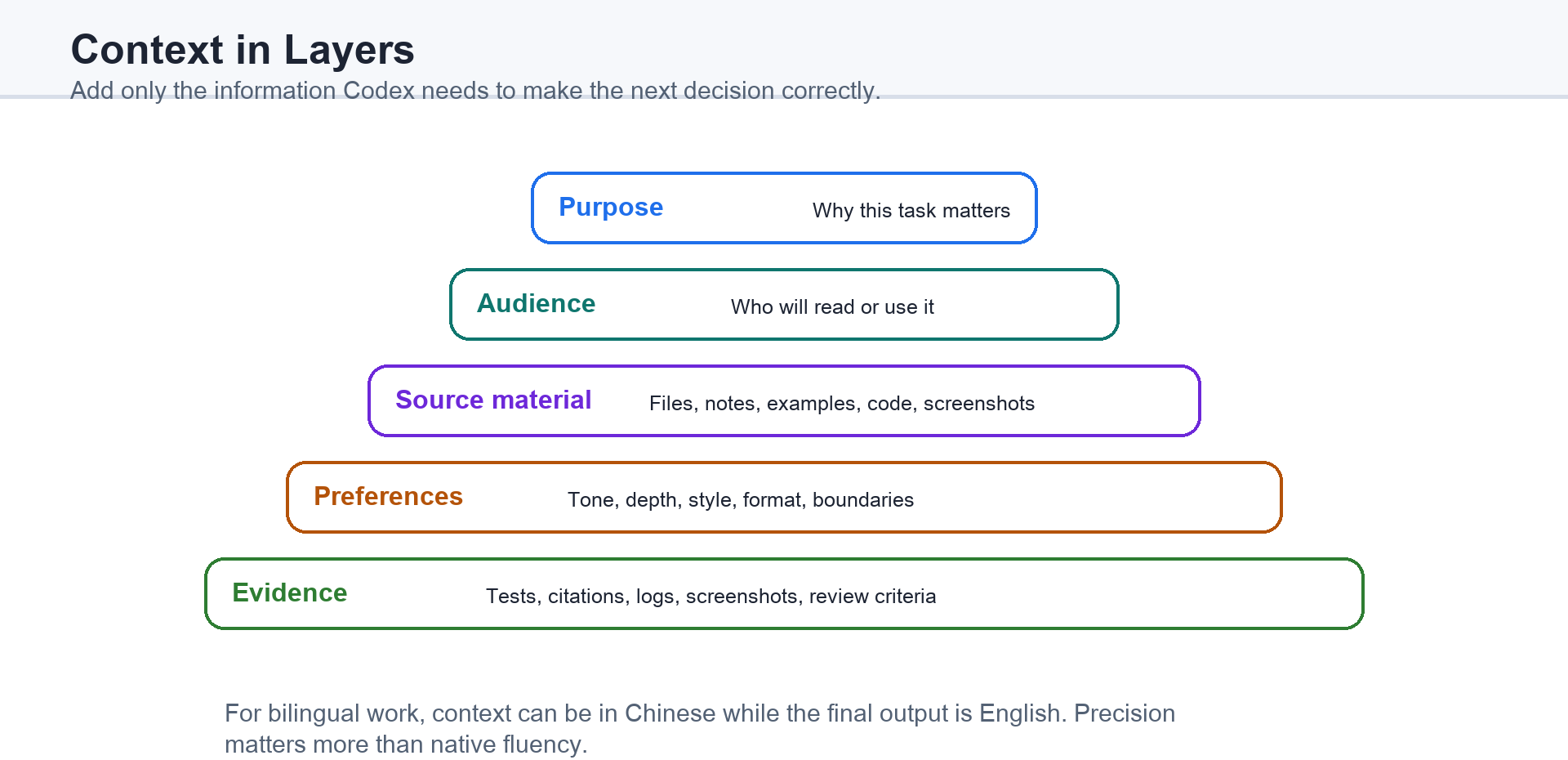
A beginner might say: “I am writing a beginner guide for people who have heard of ChatGPT but not ChatGPT. The tone should be clear and encouraging. Please avoid heavy jargon. Use examples from school, work, and daily life.” That gives ChatGPT enough context to choose examples and vocabulary.
A technical user might say: “This is a Next.js app using TypeScript and Tailwind. The bug appears only after login. Please inspect the auth flow before editing. Avoid changing database schema. If a test is missing, add a focused test near the existing auth tests.” This gives ChatGPT enough context to choose a technical path without wandering through unrelated parts of the system.
Non-English users can layer context in their strongest language and ask ChatGPT to preserve technical terms. For example: “I will explain the requirement in my native language. Please preserve English technical terms such as API, component, state, and database, then produce the final product requirements document in English.” This is often better than forcing yourself to write imperfect English for every detail. The goal is precision, not performance.
4.4 Choose the Right Instruction Style for Your Skill Level
Section titled “4.4 Choose the Right Instruction Style for Your Skill Level”Different users should talk to ChatGPT differently because they have different kinds of control.
A beginner should use simple delegation. Describe the goal, provide examples if you have them, and ask ChatGPT to explain choices in plain language. You do not need to name the exact method. You can say, “I do not know the best structure. Please propose one first.” This invites ChatGPT to help design the path.
An intermediate user should use guided collaboration. You may not know every technical detail, but you can set direction: “Give me three options, explain the tradeoffs, recommend one, and then wait for my approval before editing.” This keeps you in control while using ChatGPT to map the decision space.
A technical user should use operational instructions. Name the environment, constraints, files, commands, tests, and acceptance criteria when they matter. A technical prompt should often include verbs such as inspect, compare, modify, run, verify, summarize, and avoid. These verbs make the workflow explicit.
A team user should use role and boundary instructions. For example: “Act as a senior reviewer. Focus on correctness, security, and maintainability. Do not rewrite style unless it affects understanding. List blocking issues first.” This tells ChatGPT what kind of judgment to apply.
The skill is not writing longer prompts. The skill is choosing the right level of control. Too little control creates guessing. Too much control can trap ChatGPT in your assumptions. Good instruction gives enough structure while leaving room for ChatGPT to discover information.
4.5 Prompting Patterns for Beginners, Technical Users, and Mixed Teams
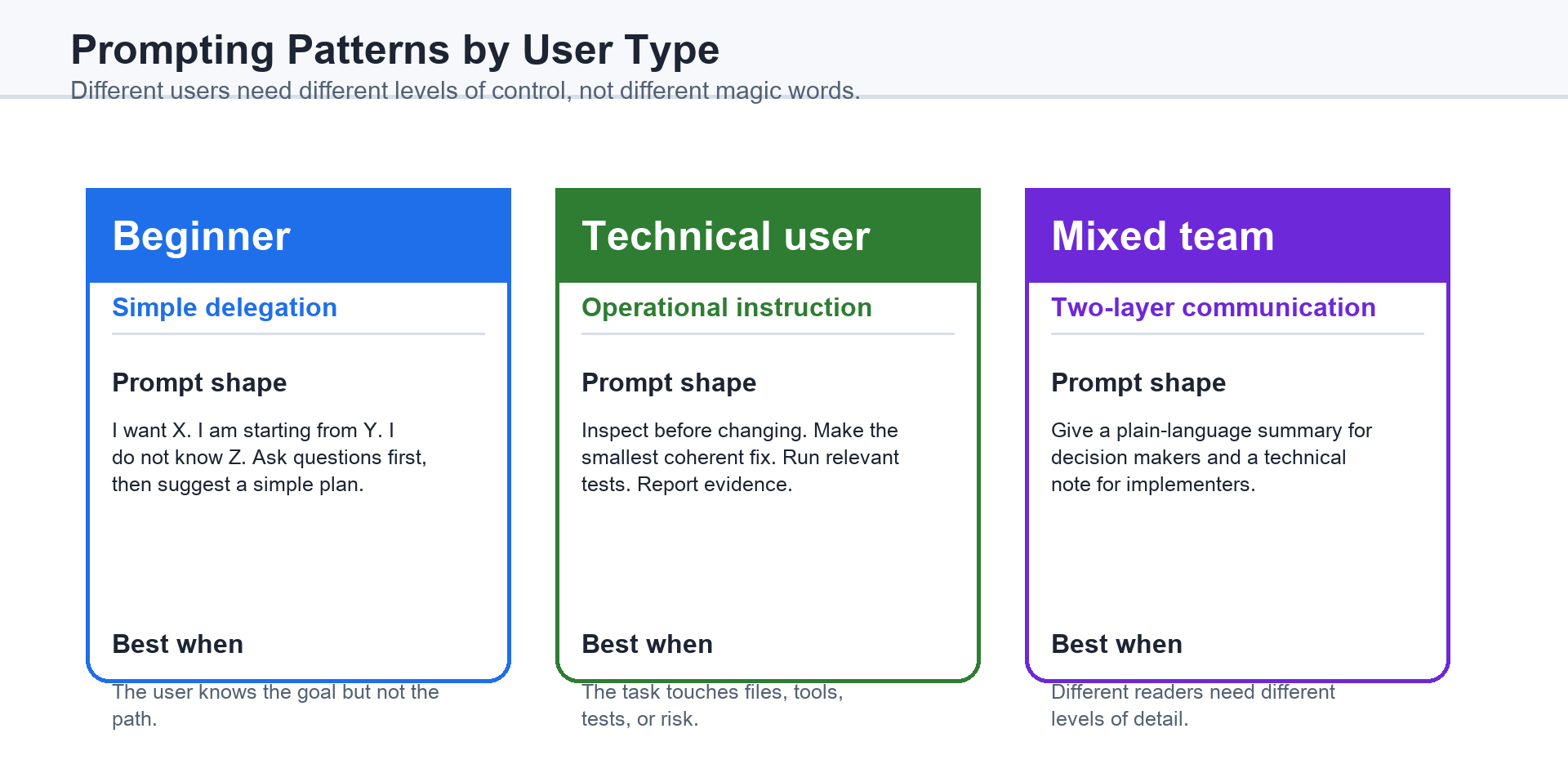
Section titled “4.5 Prompting Patterns for Beginners, Technical Users, and Mixed Teams”A beginner-friendly pattern is: “I want to accomplish X. I am starting from Y. I do not know Z. Please ask me any important questions first, then suggest a simple plan.” This pattern is useful because it allows uncertainty. You do not need to pretend you understand the whole problem.
Example: “I want to build a simple personal website. I have never coded before. I want it to introduce me, show my projects, and look professional. Please ask me the minimum questions needed, then create a step-by-step plan.”
A technical pattern is: “Investigate before changing. Explain the likely cause. Make the smallest coherent change. Run the relevant verification. Report evidence.” This pattern protects against confident but shallow fixes.
Example: “The API returns 500 when the request includes a discount code. Inspect the handler and related tests before editing. Make the smallest fix that preserves current behavior. Add a regression test if appropriate. Run the test file and summarize the result.”
A mixed-team pattern is: “Produce two layers of output: an executive summary for non-technical readers and a technical note for implementers.” This is useful when a founder, manager, designer, developer, and customer may all need different levels of detail.
Example: “Summarize this bug for our product manager in plain language, then provide a technical implementation note for the engineer. Keep the two sections separate.”
These patterns are not rigid templates. Figure 4.3 compares them as mental models. They help you decide how much uncertainty ChatGPT should resolve, how much authority it has to act, and how much evidence it must provide before you trust the result.
4.6 Working Across Languages: English, Native Languages, and Bilingual Prompts
Section titled “4.6 Working Across Languages: English, Native Languages, and Bilingual Prompts”For many users, the hardest part of using ChatGPT is not the AI. It is the language boundary around the work. A multilingual user may understand the business goal in a native language, read error messages in English, write code with English identifiers, and present the result to an English-speaking audience. ChatGPT can help bridge these layers if you tell it how to handle language.
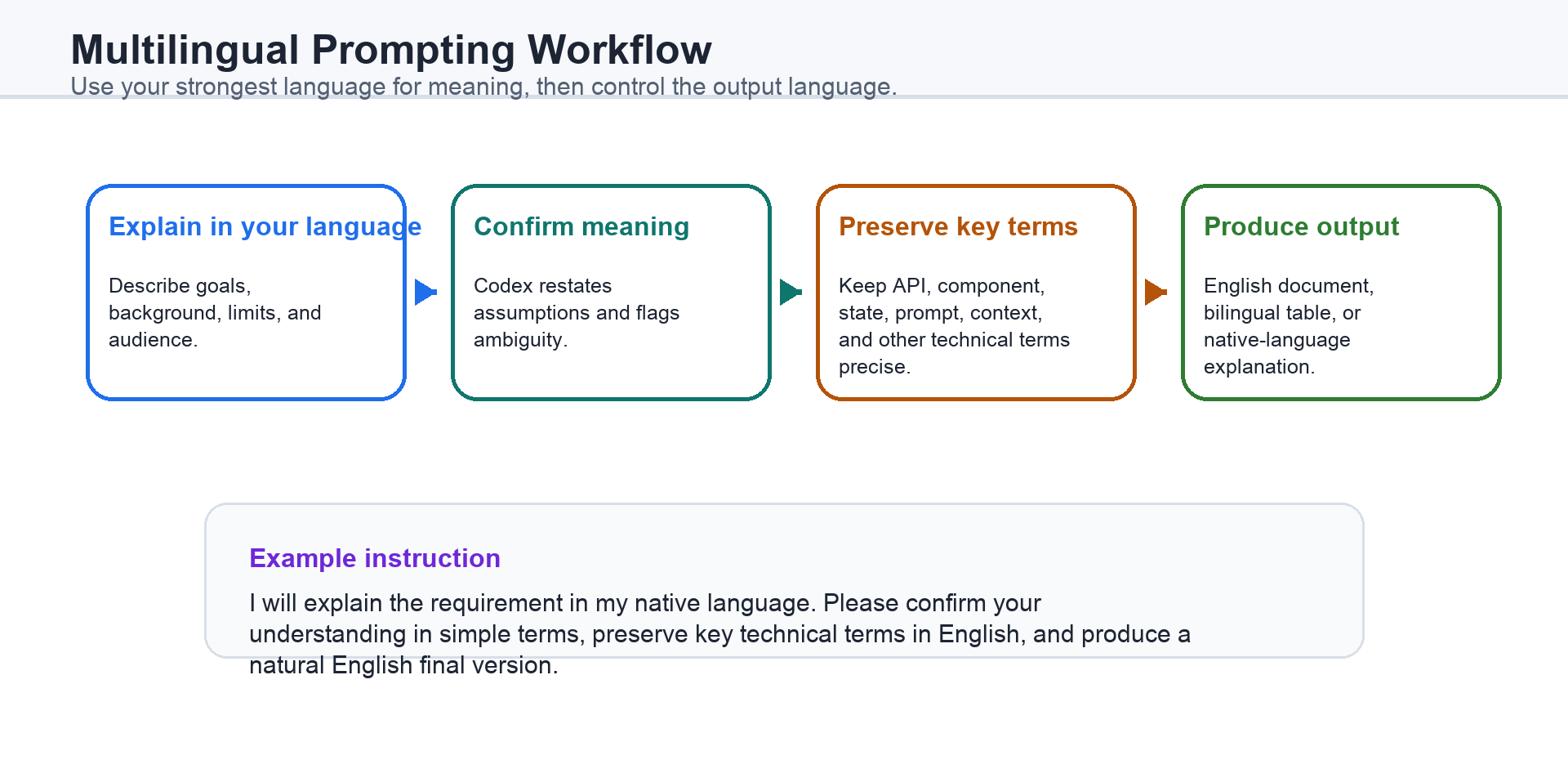
One safe approach is to separate thinking language from output language, as shown in Figure 4.4. You can say: “I will explain the background in my native language. First confirm your understanding in simple terms, then produce the final document in English.” This lets you explain subtle meaning in the language you know best while still producing an English deliverable.
Another approach is to preserve technical terms. Many technical words should not be translated every time. Terms such as API, pull request, component, state, route, dependency, test, prompt, context, and sandbox often become less precise when forced into casual translation. You can instruct ChatGPT: “Explain in simple language, but keep key technical terms in English and briefly define each one the first time it appears.”
You can also ask for bilingual alignment. For example: “Create a table with the original requirement, English product wording, and a developer note.” This is useful when the original idea comes from a non-English conversation but the implementation team works in English.
Non-native English users should not assume that better English always means better prompting. Clear structure matters more than native fluency. A prompt with simple sentences, numbered requirements, and concrete examples is usually stronger than a polished but vague paragraph.
When precision matters, ask ChatGPT to check meaning instead of merely translating words. A useful prompt is: “Translate this into natural English, but first identify any ambiguous phrases in the original language that could change the technical meaning.” This turns translation into clarification.
4.7 Ask for Plans, Drafts, Examples, and Finished Work
Section titled “4.7 Ask for Plans, Drafts, Examples, and Finished Work”ChatGPT can help at different stages of work. The mistake is asking for a finished answer when you first need a plan, or asking for a plan when you are ready for execution.
Ask for a plan when the task is large, risky, unfamiliar, or expensive to undo. A plan helps you catch misunderstanding early. For example: “Before editing the document, outline the changes you would make and explain why.”
Ask for a draft when the direction is clear but the wording or structure is still flexible. Drafts are useful for emails, reports, chapters, proposals, product requirements, scripts, and study notes. A draft should be treated as material to review, not as final truth.
Ask for examples when you are learning. Examples reveal what an instruction means in practice. If ChatGPT says “provide more context,” ask it: “Show me a weak prompt and a stronger version for my situation.”
Ask for finished work when the task is bounded and checkable. For example: “Create the spreadsheet, include formulas, format the header row, and verify that totals recalculate.” A finished-work request should usually include verification because the output is not just an answer; it is an artifact.
This distinction is important for both beginners and technical users. Beginners gain confidence by seeing intermediate steps. Technical users reduce risk by forcing planning and verification before changes become large.
4.8 Correcting ChatGPT and Tightening the Feedback Loop
Section titled “4.8 Correcting ChatGPT and Tightening the Feedback Loop”ChatGPT will sometimes misunderstand. This is normal. The important question is not whether misunderstanding happens, but whether the conversation can recover quickly.
Good correction is specific. Instead of saying, “This is wrong,” say, “The audience is not software engineers; rewrite this for business readers.” Instead of saying, “Make it better,” say, “Keep the structure, but shorten each paragraph and add one concrete example.” Instead of saying, “The code failed,” paste the error message or ask ChatGPT to inspect the failed command output.
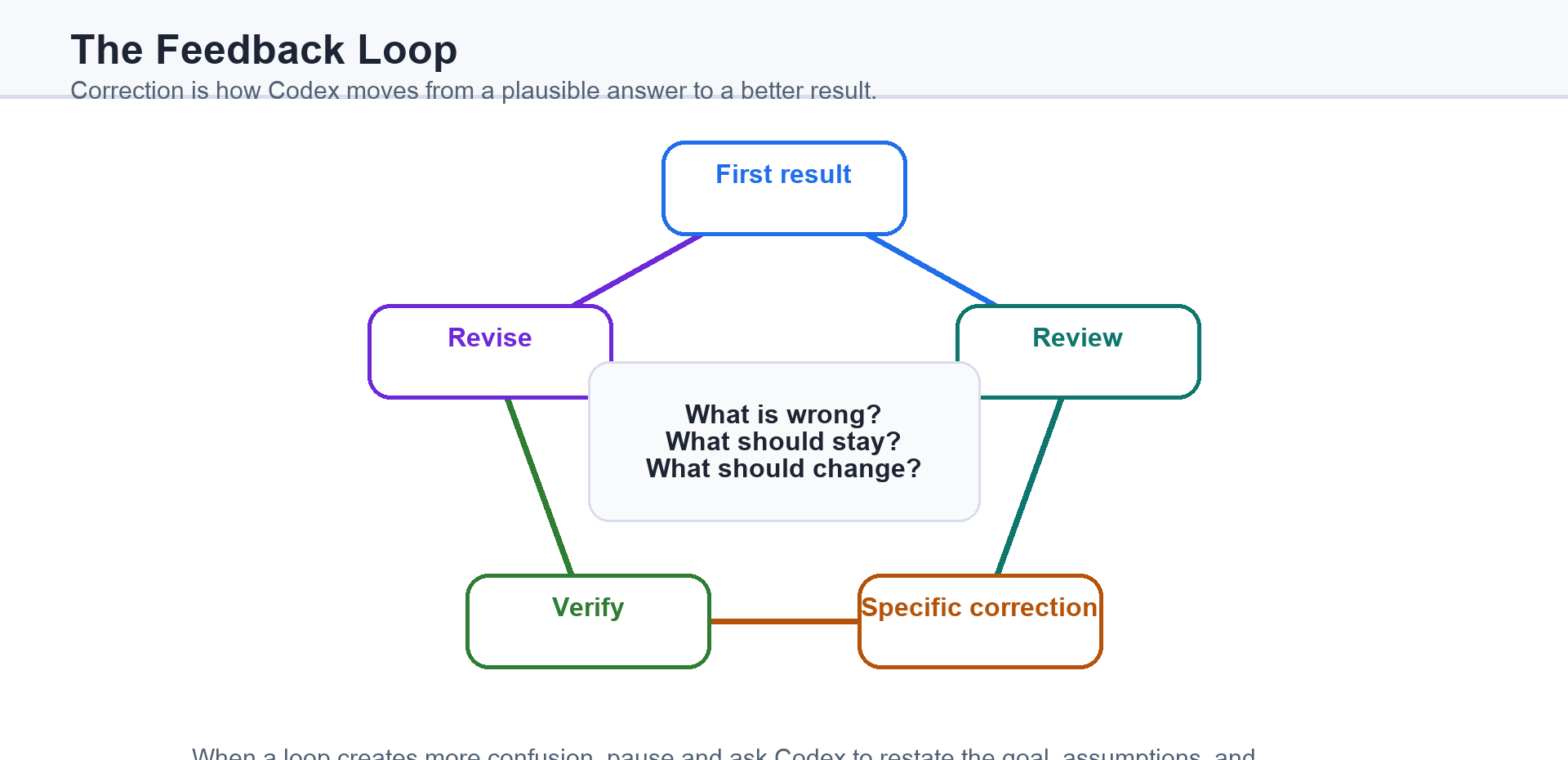
A useful correction has three parts: what is wrong, what should stay, and what should change. For example: “The explanation is too advanced. Keep the example about building a website, but remove React terminology and explain it as a simple page first.”
Technical users should add evidence to corrections. Error messages, test output, screenshots, diffs, logs, and file names are stronger than impressions. Evidence turns feedback into a diagnostic signal.
Non-English users can correct language and meaning separately. For example: “The English grammar is fine, but the meaning is not accurate. I mean the user can choose whether to authorize access; the system does not authorize automatically. Please rewrite it.” This helps ChatGPT distinguish fluency from intent.
The feedback loop should get tighter over time. Figure 4.5 shows the loop: first result, review, correction, verification, revision. Each loop should remove uncertainty. If each loop creates new confusion, stop and ask ChatGPT to restate the goal, assumptions, and current plan before continuing.
4.9 Build Conversations Step by Step
Section titled “4.9 Build Conversations Step by Step”The best ChatGPT conversations often move in stages. The first stage is orientation: explain the goal and ask ChatGPT to inspect or ask questions. The second stage is planning: choose the approach. The third stage is execution: let ChatGPT draft, edit, build, or fix. The fourth stage is verification: check the result. The fifth stage is refinement: improve what the evidence reveals.
This staged rhythm matters because ChatGPT can move faster than the human can review. If the task is small, one prompt may be enough. If the task is important, slow the conversation down at the decision points.
A beginner might use this sequence: “Ask me questions first,” then “Make a simple plan,” then “Create the first version,” then “Explain what I should review,” then “Revise based on my feedback.” This makes the AI easier to supervise.
A technical user might use this sequence: “Inspect the codebase,” then “Identify likely causes,” then “Propose a minimal fix,” then “Implement after approval,” then “Run tests and summarize evidence.” This makes the AI more reliable in complex systems.
A bilingual user might use this sequence: “I will explain the requirement in my native language,” then “Confirm your understanding in simple terms,” then “Generate the English technical description,” then “Point out possible translation risks,” then “Revise after my clarification.” This makes language part of the workflow instead of an obstacle.
The final lesson is simple: talking to ChatGPT is a form of management. You do not need to become a programmer to use it well. You do not need native English to use it precisely. You do need to describe outcomes, provide context, set boundaries, review evidence, and correct course. When you do that, ChatGPT becomes less like a mysterious answer machine and more like a disciplined collaborator inside your workspace.
4.10 Managing Agent Work and Context
Section titled “4.10 Managing Agent Work and Context”Agent work is the process of carrying a task from understanding to a verifiable finish. The prompt starts the work, but planning, progress updates, correction, delegation, and handoff keep it moving in the right direction.
- Planning: turn a complex outcome into ordered, bounded steps with checkpoints.
- Progress and guidance: ask for concise updates, inspect partial results, and redirect the work before errors compound.
- Subagents: delegate only independent, well-bounded work whose output can be reconciled by the main task.
- Handoff and recovery: preserve the goal, decisions, current state, files changed, commands run, evidence, failures, and next action.
Context layers
Section titled “Context layers”Context is what the Agent can actually use now. Project context supplies durable background; file and directory context supplies the working material; conversation context supplies the current goal and decisions. When instructions conflict, make precedence explicit.
Long work may require context compaction, but compression should preserve goals, constraints, decisions, evidence, open questions, and recovery state. Keep context focused by removing irrelevant history, and treat credentials, personal data, proprietary material, and other sensitive context as access-controlled information.
4.11 Choosing Tools and Inputs
Section titled “4.11 Choosing Tools and Inputs”Choose the narrowest tool that can complete and verify the task. Shell and terminal tools are appropriate for local files and commands; Web search is appropriate for current or external facts; browser tools and Computer Use are appropriate when visible interface interaction matters; image generation is appropriate for new or edited visuals; voice input and output are appropriate when spoken interaction is part of the deliverable.
Tool choice changes the evidence you should request. A shell task needs commands and outputs, Web research needs linked sources, browser work needs visible-state verification, and generated media needs direct inspection of the final artifact.